Windows DNS Query Resolution Policies Enable 12 Targeted Filtering Scenarios
- Akshra GJ
- 807 views
Windows DNS policies can apply restrictions by domain, subnet, time, query type and IP protocol, helping admins limit disruption while managing access.


DNS filtering can account for more than the domain a user requests. Windows DNS Query Resolution Policies (QRPs) let administrators define rules using details such as the client subnet, time of day, DNS query type and the protocol carrying the request. That means a restriction can apply to a particular group or situation while other DNS activity continues normally.
That distinction matters when a broad block starts interrupting legitimate work. A video platform might be a distraction on guest Wi-Fi but necessary for employee training. Personal webmail may warrant a restriction on a finance subnet while corporate mail remains available. A suspicious TXT query could be denied without blocking TXT records across the organization.
The policy’s usefulness depends on how precisely its conditions describe the intended boundary. DNS filtering can influence whether a client receives a DNS answer, but it doesn’t authenticate a user, terminate an existing session, or replace other controls. The following scenarios show how administrators can use Windows DNS QRPs to express narrower rules.
1. Schedule social media restrictions around work hours
A company might want to limit access to selected social media sites during focused work periods, while allowing normal use during breaks and after work. A continuous domain block can’t make that distinction. A time-based QRP can apply restrictions only during configured windows.
For example, a rule could deny requests for Facebook, Instagram and YouTube from an employee subnet between 09:00 and 12:30, then again from 15:00 to 19:00. Resolution would proceed normally outside those intervals, as far as this policy is concerned. A separate subnet condition can keep designated marketing networks out of the restriction when teams need the sites for work.
The example uses the EmployeeLAN subnet, 10.10.10.0/24, with usable client addresses from 10.10.10.1 to 10.10.10.254. The FQDN criteria include the named domains and wildcard entries for their subdomains. The action is Deny.
| Criterion | Value |
| FQDN | facebook.com, *.facebook.com, instagram.com, *.instagram.com, youtube.com, *.youtube.com |
| Time of day | 09:00–12:30 and 15:00–19:00 |
| Client subnet | EmployeeLAN, 10.10.10.0/24 |
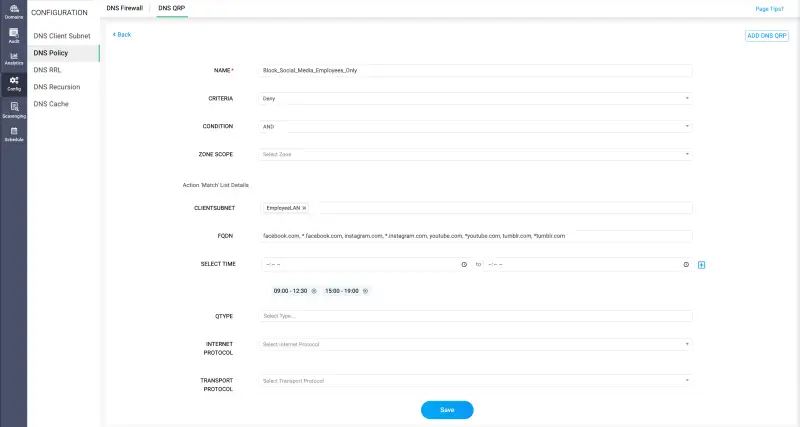
Multiple intervals in one policy let administrators align the rule with the workday without making access restrictions continuous. Teams should still confirm that the configured subnet contains the intended devices and that exceptions cover the networks whose work depends on these domains.
2. Apply streaming limits to guest Wi-Fi
At a customer event, guests may use the company’s Wi-Fi while employees work and sales staff hold video meetings. If streaming activity is affecting the guest network, restricting those domains across every subnet could also disrupt employee tasks.
A QRP can pair a client subnet with FQDN criteria. In the example, requests for Netflix and YouTube domains are denied when they come from GuestWiFi, subnet 10.10.20.0/24, whose usable client addresses run from 10.10.20.1 to 10.10.20.254. Corporate subnets aren’t included in that condition.
| Criterion | Value |
| Client subnet | GuestWiFi, 10.10.20.0/24 |
| FQDN | netflix.com, *.netflix.com, youtube.com, *.youtube.com |
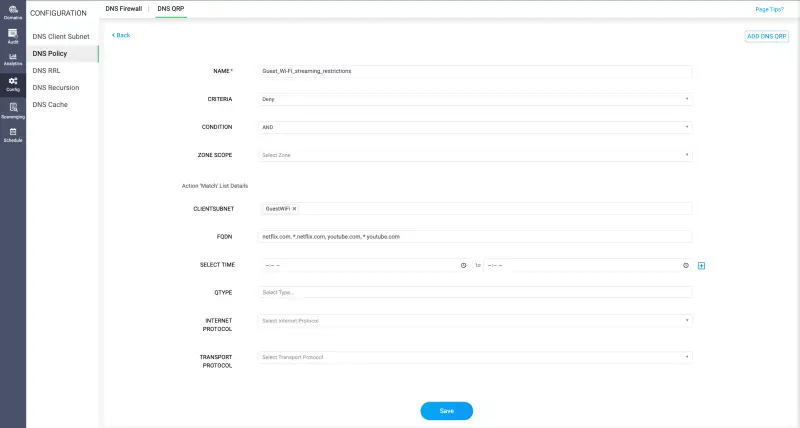
This rule only changes DNS handling for matching requests. It doesn’t guarantee available bandwidth or control traffic that already has a destination address. Administrators may need separate network traffic controls if they’re addressing capacity or quality-of-service concerns.
3. Restrict gaming domains in a school lab during class
A school can apply a gaming restriction to student devices during class hours without extending it to faculty networks or after-hours use. The example targets Roblox domains from the StudentLab subnet, 10.10.30.0/24, between 09:00 and 17:00.
The rule combines three conditions: the client subnet, the requested FQDN and the time of day. When they match, DNS requests are denied. Faculty devices outside the student subnet don’t match the rule, and student requests after 17:00 are outside its time condition.
| Criterion | Value |
| Client subnet | StudentLab, 10.10.30.0/24 |
| FQDN | roblox.com, *.roblox.com |
| Time of day | 09:00–17:00 |
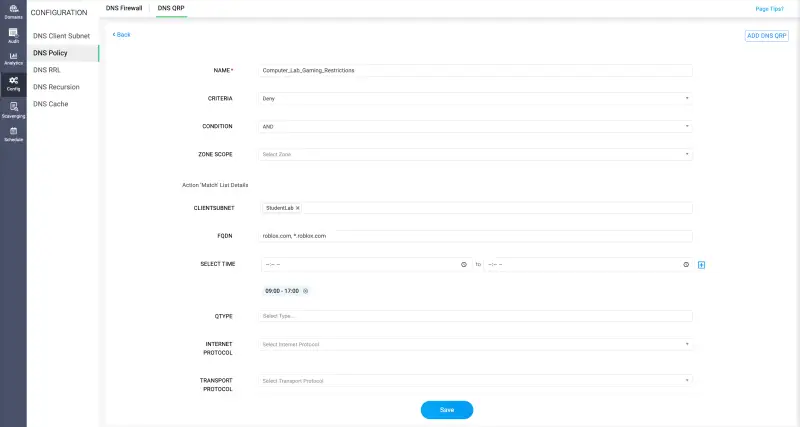
For administrators, the practical point is that a QRP can describe where, when and what to restrict in one rule. The scope still depends on accurate subnet assignments and a schedule that matches the school’s operating hours.
4. Limit personal webmail from a finance subnet
A financial services organization may want to restrict selected personal webmail hosts on workstations that handle sensitive records. A broad restriction on email-related domains could interfere with corporate messaging or authentication services, so the example targets two specific hostnames instead.
The QRP denies requests for mail.yahoo.com and outlook.live.com from the Finance subnet, 10.10.40.0/24. The condition is tied to the client network; corporate email domains aren’t part of the listed FQDN match.
| Criterion | Value |
| Client subnet | Finance, 10.10.40.0/24 |
| FQDN | mail.yahoo.com, outlook.live.com |
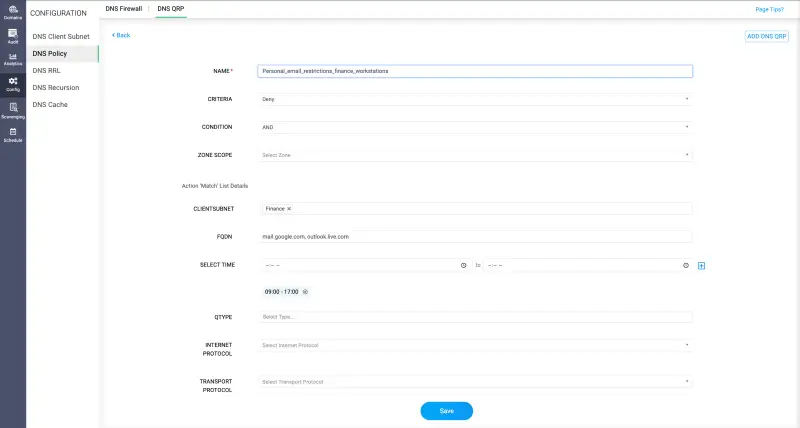
This is a DNS restriction, not a data-loss prevention control. It can prevent resolution for the named hosts under the matching conditions, but it doesn’t establish whether data has been copied elsewhere or protect every route to an online service. It can form one part of a broader security setup.
5. Deny a known malicious domain
When an investigation identifies a domain associated with phishing, an FQDN-based QRP can deny requests for that name and, if appropriate, its subdomains. The example lists phishing.manageengine.com and *.phishing.manageengine.com as the match, with the action set to Deny.
| Criterion | Value |
| FQDN | phishing.manageengine.com, *.phishing.manageengine.com |
| Action | Deny |
The rule applies the domain decision that administrators configure; it doesn’t assess threat intelligence or determine whether a name is malicious. Security teams need to identify the domain and decide whether the restriction should include subdomains. Other DNS requests aren’t affected by this FQDN condition.
6. Target an unapproved dynamic DNS hostname
Dynamic DNS (DDNS) maps a changing IP address to a stable hostname. That can support legitimate remote access and device management, but an organization may also identify an unapproved hostname associated with remote-access infrastructure.
Rather than deny every DDNS provider, the example targets remote-access-demo.ddns.net. Administrators can optionally combine the FQDN with the RemoteAccessSegment subnet, 10.10.50.0/24, using an AND condition. That scopes the denial to requests that meet both criteria.
| Criterion | Value |
| FQDN | remote-access-demo.ddns.net |
| Optional client subnet | RemoteAccessSegment, 10.10.50.0/24 |
| Condition and action | AND; Deny |
The policy can block resolution for the specified hostname under its conditions. It doesn’t stop every remote-access method or prevent DDNS updates by itself. Approved services and other providers remain outside this rule unless separate conditions target them.
7. Deny TXT requests for a specific hostname
DNS record types serve different purposes. TXT records are used for tasks such as email authentication and domain verification, and TXT lookups can also appear in investigations of suspicious DNS activity. Blocking every TXT query could disrupt legitimate services.
A narrower rule combines the hostname suspicious.manageengine.org with the TXT query type. With an AND condition and the action set to Deny, matching TXT requests are blocked, while A, AAAA and other record queries can continue through normal processing under this policy.
| Criterion | Value |
| FQDN | suspicious.manageengine.org |
| Query type | TXT |
| Condition and action | AND; Deny |
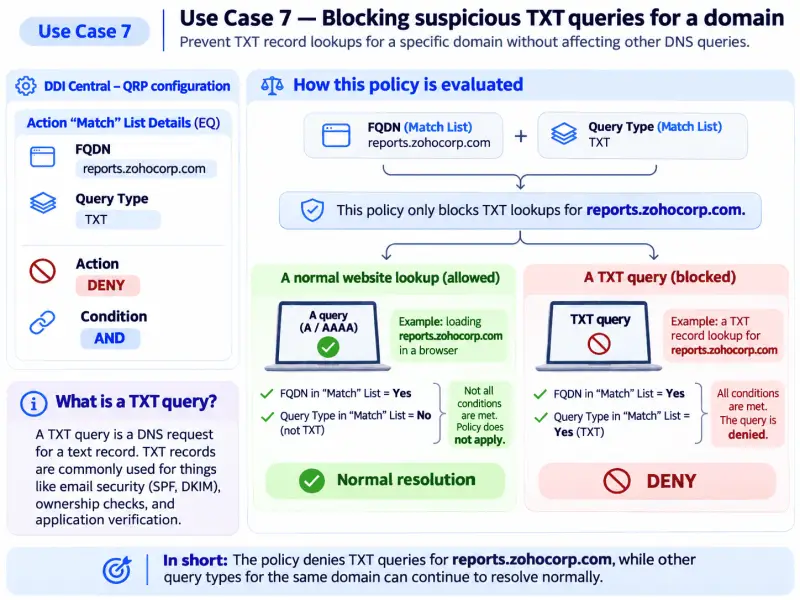
This is a targeted DNS response to a particular hostname and record type. It isn’t a general detection method for DNS tunneling; other names or query types may also require investigation. The rule’s scope should follow the behavior the security team is examining.
8. Deny ANY queries from a specified subnet
An ANY query requests information about the resource-record sets associated with a name. Depending on the DNS implementation, such requests can produce larger responses and may be relevant to amplification concerns. If administrators observe unwanted ANY requests from a specific network, a QRP can pair that subnet with the ANY query type.
The example denies ANY queries from UntrustedNetwork, 10.10.60.0/24. A, AAAA, MX and TXT requests from that subnet aren’t matched by this query-type condition, and the rule doesn’t target other subnets.
| Criterion | Value |
| Client subnet | UntrustedNetwork, 10.10.60.0/24 |
| Query type | ANY |
| Condition and action | AND; Deny |
Filtering ANY queries is one possible DNS control. It doesn’t replace response-rate limiting or broader denial-of-service protections, and administrators should assess it alongside the rest of their DNS controls.
9. Restrict lookups during an application maintenance window
During scheduled maintenance, an infrastructure team may want to discourage new DNS lookups for one application without affecting other services. The example targets hr.zohocorp.com between 22:00 and 23:00 and denies matching requests during that hour.
| Criterion | Value |
| FQDN | hr.zohocorp.com |
| Time of day | 22:00–23:00 |
| Condition and action | AND; Deny |
Administrators can adjust the configured interval to fit the maintenance schedule. The time condition can make a recurring restriction easier to manage than a rule that must be enabled and disabled by hand.
DNS filtering affects new lookups handled by the policy. Clients may still have cached answers, and existing connections can remain active. Application maintenance controls must handle those cases; a DNS rule alone doesn’t shut down the application or disconnect its users.
10. Restrict a reporting portal outside operating hours
A reporting portal may be intended for routine use by an operations team between 08:00 and 20:00. Windows DNS QRPs can express the opposite of a time match: a rule can match requests outside the approved interval and deny them.
The example targets reporting.zohocorp.com from Operations, subnet 10.10.70.0/24. Its Time of Day criterion uses NOT EQ with 08:00–20:00, and the action is Deny. During the stated hours, that condition doesn’t match, leaving the request to normal DNS processing under this rule. Outside the interval, matching requests are denied.
| Criterion | Value |
| FQDN | reporting.zohocorp.com |
| Client subnet | Operations, 10.10.70.0/24 |
| Time of day | NOT EQ 08:00–20:00 |
| Condition and action | AND; Deny |
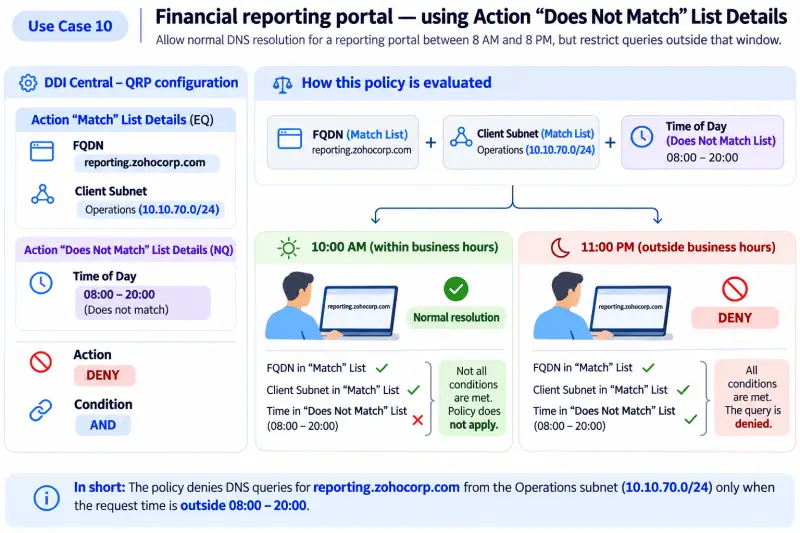
A time-based DNS condition doesn’t authenticate the requester or end an existing session when the approved window closes. Identity and application controls handle those functions. DNS adds a layer that can align resolution with the intended operating schedule.
11. Exclude the IT subnet from an administrative-hostname restriction
Internal administration portals for network, backup, monitoring and server systems may only be intended for IT operations staff. A rule can deny DNS requests for an administrative namespace when they come from networks outside an approved IT subnet.
The example targets admin.zohocorp.com and *.admin.zohocorp.com, with a client subnet criterion of NOT EQ IT_Admins, 10.10.80.0/24. Under an AND condition, requests for those names from other networks are denied. Requests from IT_Admins don’t match the subnet condition and are therefore outside this denial rule.
| Criterion | Value |
| FQDN | admin.zohocorp.com, *.admin.zohocorp.com |
| Client subnet | NOT EQ IT_Admins, 10.10.80.0/24 |
| Condition and action | AND; Deny |
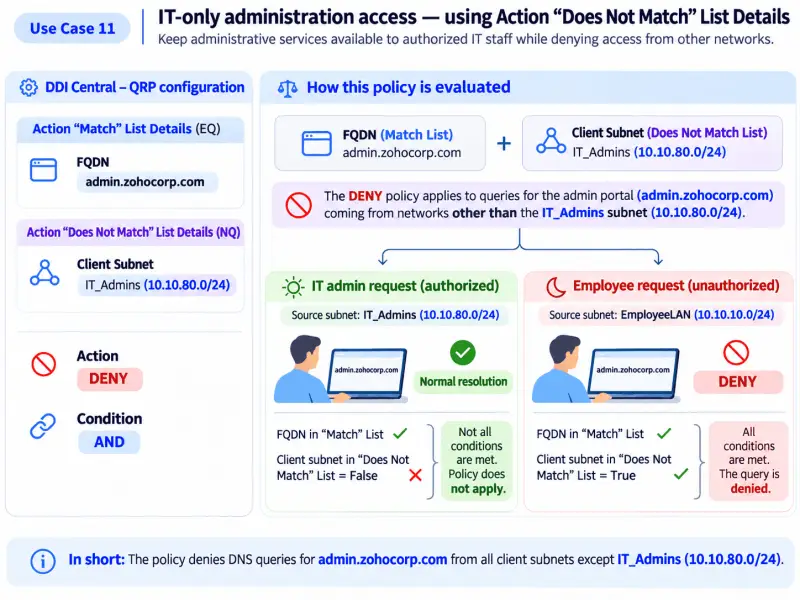
DNS restrictions can reinforce network boundaries, but they don’t secure an administrative portal on their own. Firewalls, authentication, privileged access controls and network segmentation still matter. The QRP’s role is to control resolution under the conditions it defines.
12. Apply different handling by IP transport protocol
In a dual-stack network, an administrator may want to test IPv6 behavior for an application while leaving IPv4 DNS requests unaffected. Windows DNS QRPs can distinguish the IP protocol carrying the DNS request from the DNS record type being requested.
The example targets legacy.example.com and uses an Internet Protocol criterion of NOT EQ IPv6, with the action Deny. This denies requests arriving over IPv6 while IPv4 requests fall outside the rule. The alternative described is an Internet Protocol criterion of NE IPv4, which produces the same distinction when IPv4 and IPv6 are the only possible protocols.
| Criterion | Value |
| FQDN | legacy.example.com |
| Internet Protocol | NOT EQ IPv6 |
| Action | Deny |
This criterion concerns how the DNS query reaches the server. It doesn’t say whether the client requested an A or AAAA record: an A query can travel over IPv6, and an AAAA query can travel over IPv4. Keeping transport protocol and query type distinct helps avoid confusing two different parts of DNS behavior.
What administrators should take from these examples
Across the 12 scenarios, the same policy building blocks recur: FQDN, client subnet, time of day, query type and Internet Protocol. QRPs can combine matching and non-matching conditions, then apply an action to requests that meet the rule. The value is in defining the scope precisely enough that the rule fits the operational need.
| Broad blocking | Context-aware DNS policy |
| Applies a domain restriction across users | Can target selected client subnets |
| Applies continuously | Can use defined time windows |
| Treats query types alike | Can match a particular DNS query type |
| May disrupt unrelated services | Can include exceptions and exclusions |
| Focuses on what to deny | Can also define which requests remain outside the rule |
Before applying a restriction, administrators should check that the domain patterns cover the intended names, the subnet maps to the intended clients, and the time condition reflects the organization’s schedule. They should also consider what happens to cached DNS answers and existing sessions, since DNS filtering doesn’t necessarily affect either.
Microsoft Windows DNS provides the underlying QRP capability. ManageEngine DDI Central offers a central interface for managing native Windows DNS policies, with criteria such as FQDN, client subnet, time of day, query type, Internet Protocol and transport protocol. The product also brings DNS management together with DHCP and IP address management. Details on creating policies are available in the DDI Central Windows DNS QRP guide.
The operational test for a DNS restriction is straightforward: can the policy address the intended domain, network, time or query behavior without disrupting unrelated work? Administrators who answer that question before applying a rule can make DNS filtering more purposeful and easier to review.


