Windows DHCP Policies Use Client Fingerprints to Target Device Settings
- Vikram Adhithiya
- 885 views
Microsoft DHCP policies can apply tailored settings to matching device groups. DDI Central provides a central interface for managing scope, conditions, DHCP options and DNS behavior.

When a Windows network serves phones, workstations, printers and IoT devices, a single DHCP configuration may not meet every group’s needs. Microsoft DHCP policies let administrators match incoming requests against client attributes and apply settings to requests that meet the configured conditions. ManageEngine DDI Central provides a centralized interface for creating and managing those policies.

This approach can reduce repetitive configuration as a device fleet grows, provided administrators identify clients using attributes they actually supply and choose settings appropriate to the deployment. A policy can cover a group of matching clients; it doesn’t remove the need to verify how devices behave or where a policy applies.
Match requests to device groups
DHCP requests can include information that helps distinguish one type of client from another. Depending on the environment, administrators may use vendor class, user class, client identifier, MAC address, fully qualified domain name (FQDN), or relay agent information. Microsoft DHCP policies evaluate configured conditions against incoming requests and apply the corresponding settings when a request matches.
Those settings can include an address range, DHCP options and lease duration. Administrators can also define a policy’s scope at the server level or within an individual subnet. Choosing the scope matters: a setting intended for phones in one segment may not suit workstations elsewhere. DDI Central lets administrators select the policy scope and, where applicable, specify its associated IP address range.
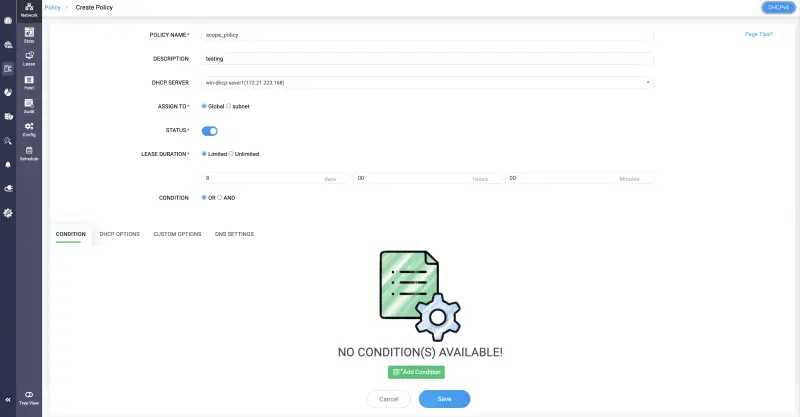
The identifying attribute should be checked against the actual client requests. For example, a vendor class value can be useful if the relevant phones consistently provide it. The appropriate match depends on the device model, its configuration and the information available to the DHCP server. A value that is assumed rather than verified may fail to match the intended devices or may match more broadly than planned.
Reuse one policy across a phone fleet
Consider a Windows DHCP environment serving 1,000 Grandstream VoIP phones. Configuring each phone’s DHCP settings separately would repeat much of the same work, and another batch of devices would add more individual configuration tasks.
Instead, an administrator can use a verified attribute in the phones’ DHCP requests to define a policy for the intended group, then associate that policy with the required network and provisioning settings. When a request satisfies the conditions, the DHCP server can apply the corresponding configuration. Additional compatible phones can use the same policy if they provide the expected attribute and the server is configured appropriately.
The same pattern can serve other groups, such as printers, workstations and IoT devices. The practical benefit is a repeatable way to manage settings for clients that match defined conditions. It can make changes easier to maintain as a network grows, while keeping the configuration tied to the client group and scope for which it was designed.
Build conditions that match the intended clients
DDI Central supports policy conditions based on several DHCP client attributes:
Vendor class: Match information identifying a client’s vendor class.
User class: Use client-provided user class information to distinguish groups.
MAC address and client identifier: Match the hardware address or identifier supplied by the client.
FQDN: Use the client’s fully qualified domain name as a condition.
Relay Agent Information: Evaluate supported information provided by a relay agent.
Circuit ID, Remote ID and Subscriber ID: Use these where they are available and relevant to the network.
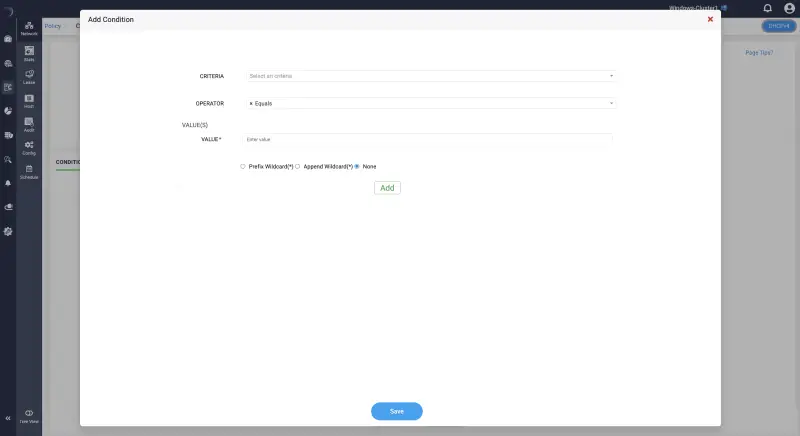
For the Grandstream deployment, a verified vendor class value may be suitable if the phones provide it consistently. DDI Central also supports prefix and append wildcards for matching values by pattern. A wildcard at the beginning matches values ending with the specified pattern; one at the end matches values beginning with that pattern.
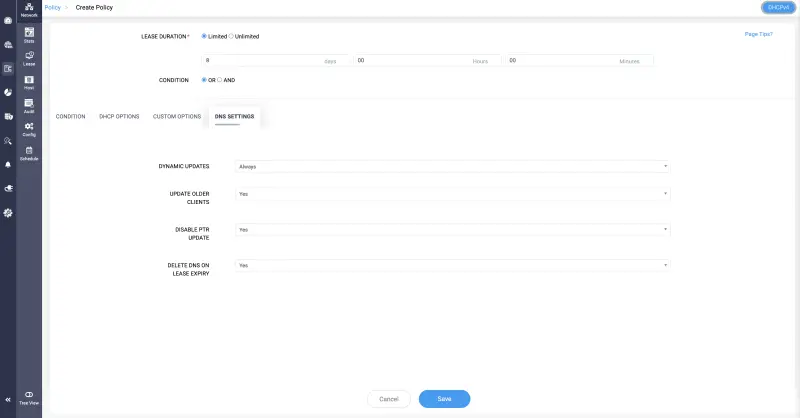
Administrators can combine conditions with logical operators. With AND, every configured condition must be satisfied. With OR, at least one must match. These controls help refine which requests receive a policy’s settings. Teams should choose conditions based on observed client attributes and the intended scope, then confirm that the match is appropriately narrow for the deployment.
Set DHCP options for compatible phones
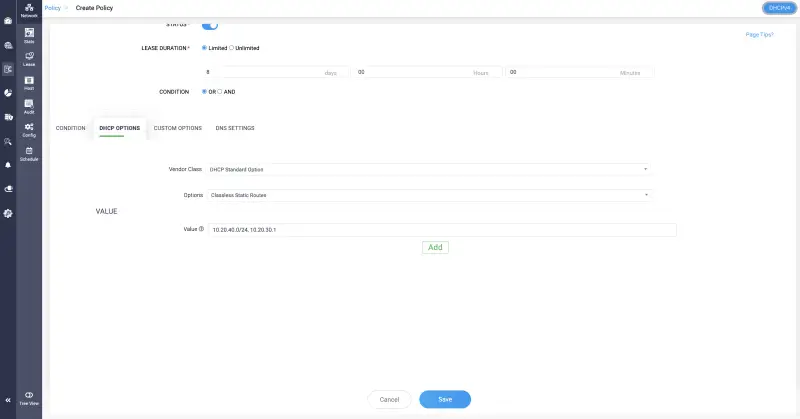
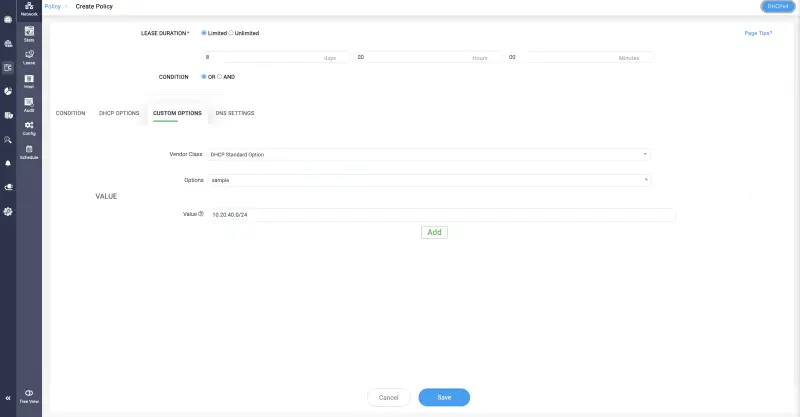
After defining the match, administrators can associate the policy with the settings the device group requires. For compatible phones, the options may include:
Provisioning server (Option 66): Direct compatible phones to the server hosting their configuration files.
SIP server (Option 120): Provide the SIP server’s IP address or FQDN where the phones and deployment support this option.
Network settings: Apply the relevant IP address range and options such as the default gateway, DNS servers and NTP server.
Once the policy is configured and enabled, Windows DHCP can apply its settings to requests that meet the conditions, subject to the server’s configuration and policy behavior. Administrators should ensure the options suit the phone deployment and are supported by the devices. A matching rule handles DHCP configuration; it does not itself establish that a phone can reach or use the referenced provisioning or SIP services.
Coordinate DNS behavior with DHCP
DDI Central also offers policy-level DNS settings for managing records associated with DHCP clients. These include how dynamic updates are configured, whether records can be updated for older clients that do not support dynamic updates themselves, whether PTR updates are disabled, and whether DNS records are deleted when a lease expires.
These choices affect how names and addresses are maintained alongside DHCP leases. Administrators should align them with the organization’s DNS architecture and the behavior expected from its clients. The right settings depend on the environment; the available controls provide a way to manage record updates as part of a device-specific policy.
Keep policy behavior predictable as devices change
A reusable policy can reduce repeated administration when devices are added, but only while the new clients meet its configured conditions and the policy remains enabled. The selected Windows DHCP server evaluates incoming requests against those conditions and applies the relevant settings to matches, subject to its configuration and policy behavior.
For network teams, the main operational task is to keep the match, scope and associated options aligned. Review which clients provide the chosen identifying attributes, confirm the subnet or server scope, and check that the DHCP and DNS settings fit the device group. With those elements in place, DDI Central gives administrators a central interface for managing Microsoft DHCP policies as device requirements change.


