Two-Domain Employee Offboarding Needs Identity Checks and Ticketed Exceptions
- Hemanand Jayavel
- 761 views
A three-template ADManager Plus workflow checks mailbox holds, provisioning status and duplicate identities before deletion, with every outcome sent to a ticket.
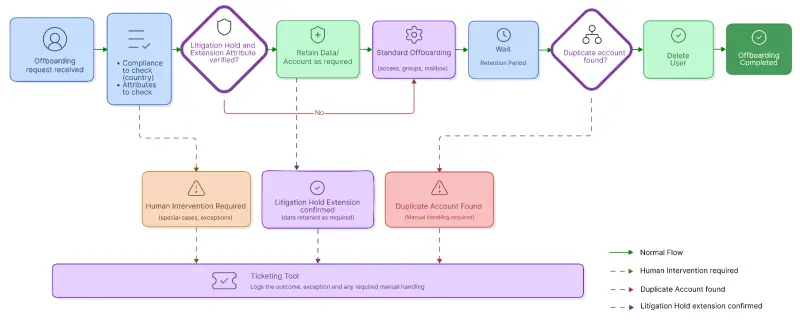
Offboarding accounts across two connected Active Directory domains calls for more than a faster cleanup sequence. If a person has an account in each domain, a workflow that sees only one can disable or delete the wrong identity. And if it doesn’t check for mailbox holds or confirm that provisioning data is ready, automation can make an existing mistake harder to recover from.
Meredian Group, a pseudonym for a group of companies, faced that combination. Its parent company ran Domain 1; a concierge services subsidiary ran the separate Domain 2. Some employees had worked in both businesses or moved between them without their earlier account being closed. The same person could therefore have a legitimate identity in each domain.
The organization’s manual process relied on finding and closing an account in whichever domain the task covered. That approach could leave a second identity active, or lead to the wrong account being removed. The workflow built for Meredian addressed that risk with checks before action, separate automations for each domain, and a ticketing record for every outcome.
Why a longer checklist wasn’t enough
A typical offboarding sequence can include resetting a password, removing Active Directory group memberships, revoking cloud security group access and role assignments, handling the mailbox, reclaiming Microsoft 365 licenses, moving the user object and scheduling its deletion. The order matters, and so does confirmation that each action succeeded.
Simply automating those steps would repeat the same assumptions at higher speed. A missed litigation hold could leave a mailbox at risk of deletion. A duplicate identity could make the wrong account the target. A checklist might say “offboarded” without confirming the account was disabled, while an overlooked role assignment or failed license revocation could leave access in place. An exception that never reaches the ticketing system can disappear from view.
These aren’t just missing actions. They are missing decision points. The workflow needs to know when it can proceed, when it must stop and when someone needs to review the case.
Two checks gate the process
Meredian’s design uses two checks before any Active Directory changes begin. The first reads an extension attribute: one of the 15 general-purpose fields, extensionAttribute1 through extensionAttribute15, available in the Active Directory schema for administrators to define. In this environment, the attribute serves as an indicator that the account’s HR or provisioning sync has completed.
If the selected attribute is blank, the workflow can’t rely on that sync state. It stops before taking Active Directory action and sends the case to the ticketing tool for manual handling.
The second check looks for Litigation Hold on the mailbox. A hold preserves mailbox contents from permanent deletion, so the workflow must keep the mailbox intact while the hold is active. If it finds a hold, it stops and routes the case for human review. Only accounts that pass both checks move into the cleanup sequence.
That separation matters in a two-domain setup. The provisioning check helps establish that the account record is ready to act on; the mailbox check prevents the cleanup from overriding a preservation requirement. Neither check alone can identify a duplicate account in the other domain, so that risk gets its own decision point.
Three orchestration templates divide the work
The implementation uses ManageEngine ADManager Plus orchestration templates to connect action sequences, decision blocks and webhooks. The action sequences perform cleanup, the decision blocks evaluate conditions, and webhooks send results to the configured ticketing tool.
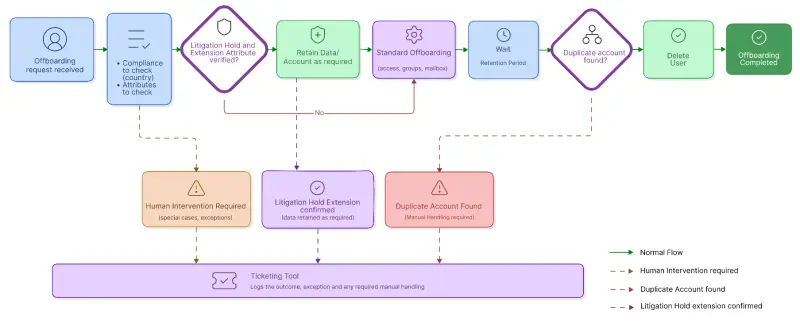
Automation 1 handles native offboarding in Domain 1. After the two initial checks pass, it resets the password, adds a timestamped update to the account’s Description, revokes groups, licenses and roles, and removes the mailbox. It then checks the user’s country attribute to determine whether the account is EU/UK or outside those regions.
- Outside the EU/UK: The workflow disables the account and moves it to a specified organizational unit. If the move succeeds, it schedules deletion after 90 days.
- EU/UK: It follows the same path, then verifies that the account is disabled after the 90-day wait before deletion. That additional confirmation reflects the tighter compliance expectations described for the region.
Automation 2 handles native offboarding in Domain 2. It runs the same two initial checks and core cleanup sequence, with a mailbox conversion and an extension attribute update. Its final decision checks Domain 1 for a duplicate identity rather than branching on region.
- No duplicate found: The workflow writes the result to the ticketing tool, waits 90 days and proceeds with deletion.
- Duplicate found: It stops short of deletion, records the duplicate account’s email address in the ticketing tool and opens a ticket. That gives an administrator the information needed to decide which identity is appropriate to close.
Automation 3 is the cleanup handler for flagged Domain 2 accounts. It repeats the initial checks and cleanup sequence, but skips the duplicate search because that check has already taken place upstream. A successful run writes back to the ticketing tool and schedules deletion after 90 days; a failure is routed to a person for handling.
Ticket writebacks make exceptions visible
Every path in the workflow produces a ticketing update. If an initial check fails, the system creates a manual-handling ticket before any Active Directory action runs. A completed offboarding generates confirmation. A duplicate found in Domain 1 is recorded with its email address and routed into the cleanup handler process. Failures also go to a person rather than ending as an internal status that nobody sees.
This makes the ticketing tool part of the control flow: it records both the outcome and the cases that need follow-up. The workflow can stop safely, but the stop has to reach someone who can resolve it.
What administrators should take from the design
Organizations with multiple domains may have similar duplicate-identity exposure, particularly when they operate across subsidiaries, spin-offs, acquisitions or older environments that haven’t been consolidated. The risk is not limited to two domains: whenever a person can have multiple valid identities, a process that checks only the account in front of it can make an incomplete or unsafe decision.
The practical lesson is to map the conditions that should halt or redirect an offboarding before automating the cleanup. For this workflow, those conditions include an unconfirmed provisioning state, a mailbox hold, a cross-domain duplicate and a failed action. Administrators should also decide which data identifies a duplicate, who handles a stopped case, and how the workflow confirms deletion readiness after the retention period.
Meredian’s approach uses decision blocks to branch on account and mailbox state, chained actions for cleanup, and webhook writebacks to keep the ticketing system informed. Its central design choice is that the workflow can stop when a condition makes continued processing unsafe. That’s the difference between automating a list of tasks and automating an offboarding process that can account for exceptions.


