Veeam Merge Space Errors: Rescan the Repository When Capacity Looks Sufficient
- Lucas Magnum
- 528 views
Veeam merge jobs can report a space error despite visible free capacity. A repository rescan resolved this case; check quotas and file system limits too.
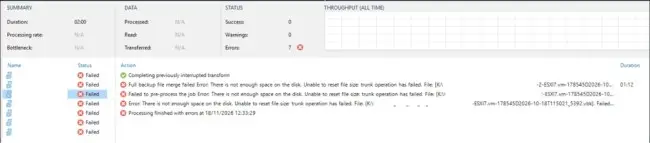
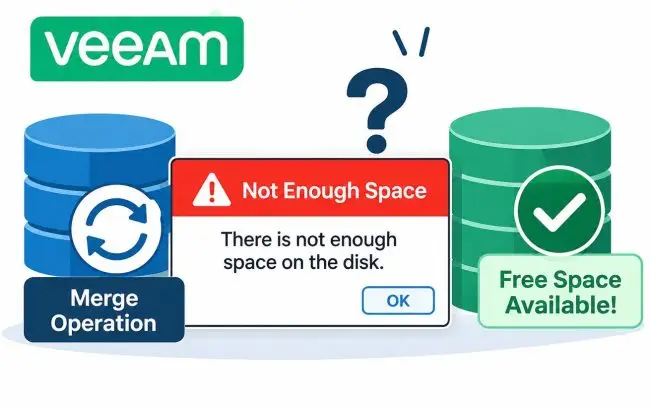
A Veeam Backup & Replication merge can fail with an insufficient space message even when the repository appears to have capacity left. In one VMware vSphere environment, rescanning the affected repository refreshed Veeam’s repository information, and the backup jobs completed successfully when rerun. That makes a rescan a practical troubleshooting step when the reported capacity and the error don’t agree.
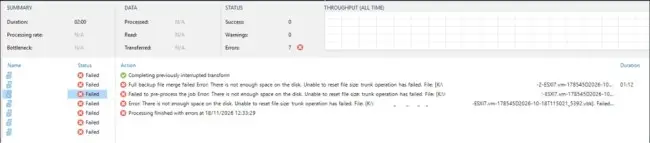
What failed during the merge
Several backup jobs failed during routine processing. Veeam displayed these errors:
Full backup file merge failed
There is not enough space on the disk
Unable to reset file size: trunk operation has failed
The failure involved a merge in the backup chain. Merge operations consolidate data between existing restore points as part of backup file maintenance. When that work cannot complete, the affected job fails, even if the repository’s displayed free capacity seems adequate.
Storage checks in this environment didn’t identify a capacity shortage that explained the failures. The investigation showed available space across the storage pools and drives, including a scale-out system reporting 29.6 TB of capacity and 2.3 TB free. Those figures didn’t point to a full disk, so the checks shifted to other possible limits and to whether Veeam had current information about the repository.



Free capacity isn’t the only constraint
Veeam KB1827 describes causes of “There is not enough space on the disk” that can extend beyond the amount of free storage shown for a volume. File system limits, storage quotas, and other restrictions on write operations can also affect whether a backup file can be changed. Merge operations have their own free space requirements, so visible capacity alone doesn’t establish that every required write can succeed.
For administrators, that distinction matters during troubleshooting. A capacity display answers how much space appears available; it doesn’t rule out a quota or another limit that affects the operation. Veeam’s view of repository contents and infrastructure information is another factor to consider, particularly where repositories or storage layouts have changed.
Rescanning refreshes Veeam’s information about existing backups on a repository. For a Scale-Out Backup Repository (SOBR), it also updates information about extents, Data Mover status, and available capacity. That can help when an environment includes multiple repositories, file movements, or storage infrastructure changes. It doesn’t add physical space or remove file system limits and quotas, so a successful rescan shouldn’t be treated as proof that those conditions don’t exist.
Rescan the repository and retry
In this case, the administrator rescanned the repository used by the failed jobs from the Veeam console. The procedure was:

- Open the Veeam Backup & Replication console.
- Go to Backup Infrastructure, then select Backup Repositories.
- Find the repository used by the failed jobs.
- Right-click the repository and select Rescan.
- Wait for the rescan to finish, then rerun the backup jobs.
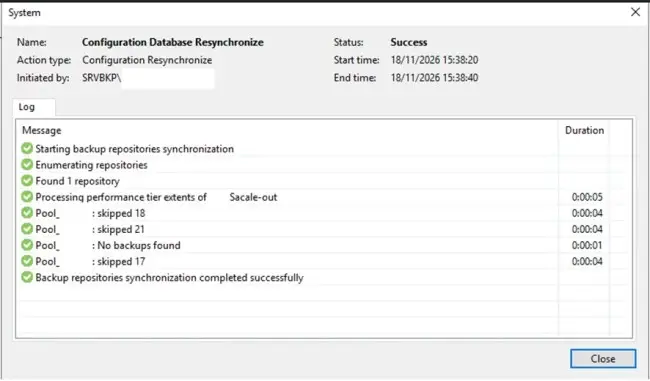
After the rescan completed, the jobs were rerun and processing finished without the same insufficient space error. The case also recorded a successful configuration database resynchronization and repository synchronization log.
What to check before changing retention
If a merge fails while the repository appears to have room, first verify the storage available to the affected repository and consider whether quotas, file system limits, or other write restrictions could apply. Then assess whether a rescan is appropriate to refresh Veeam’s repository information. If the environment uses a SOBR, the refresh also covers its extents and related status information.
A rescan is a targeted step, not a capacity fix. If the error continues, the underlying restriction still needs investigation. Avoid treating the error text alone as a reason to delete backup files or change retention settings: those actions don’t follow from the reported symptom, and the case described here was resolved by refreshing repository information.
Veeam’s documentation covers the error and the repository rescan process:
- Veeam KB1827: There Is Not Enough Space on the Disk
- Rescanning backup repositories
- Rescanning Scale-Out repositories
- Backup file placement for the performance tier
When displayed capacity and a merge error conflict, check both the storage constraints and the repository information Veeam is using. In this environment, a rescan restored successful processing without a reported change to physical capacity.


