PostgreSQL Bloat After VACUUM: Four Causes and How to Fix Them
- Chandan Shukla
- 650 views
VACUUM makes dead-row space reusable, but tables and indexes may stay large. Learn what to measure, tune and rebuild in PostgreSQL 18.4.
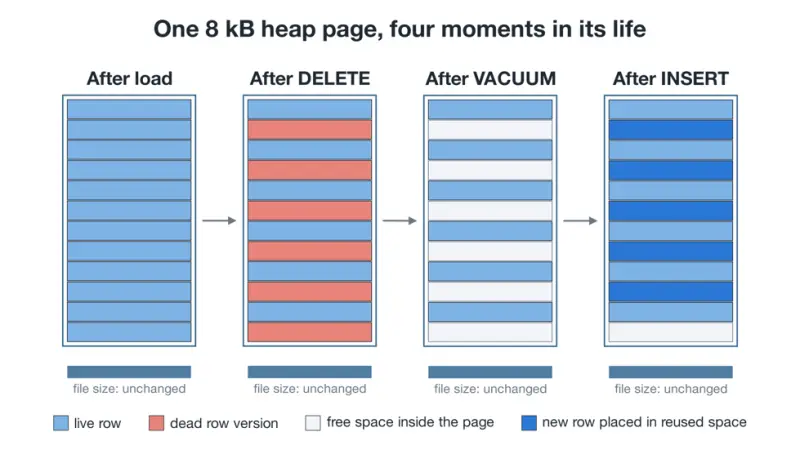
VACUUM can finish successfully while a PostgreSQL table stays just as large, its indexes keep accumulating pages, and scans read more data than they used to. That’s because vacuuming makes space reusable; it doesn’t generally compact a table or rebuild its indexes. On busy systems, delayed cleanup and old snapshots can add to the problem.
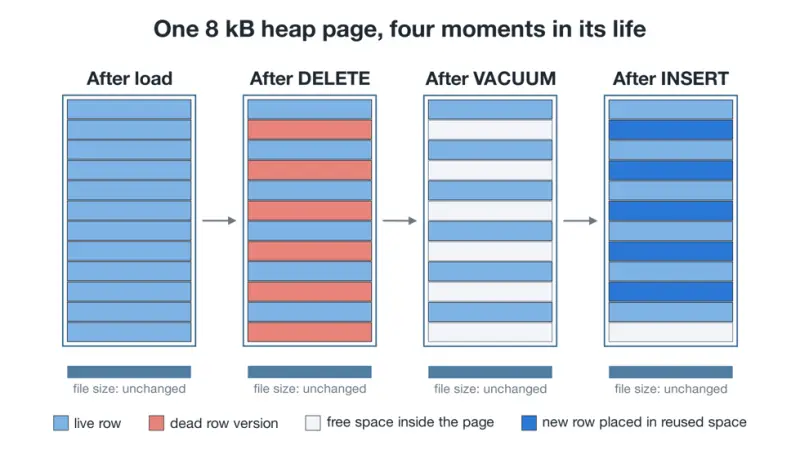
That distinction matters when teams interpret a low n_dead_tup count as proof that storage is compact, or assume regular autovacuum runs mean every table is keeping pace with writes. Four different conditions can leave a database carrying excess pages: scattered free space in the heap, underused or deleted B-tree pages, autovacuum thresholds that are too relaxed for a large table, and transactions that hold back cleanup. The right response depends on which one is present.
The measurements and workload examples here were run on PostgreSQL 18.4, using a Homebrew build on a MacBook with an Apple M5 Max and 48GB of memory. The results illustrate the mechanisms; timings and exact sizes will vary with hardware and PostgreSQL version.
Why vacuuming doesn’t necessarily shrink a table
PostgreSQL uses multi-version concurrency control (MVCC). An UPDATE writes a new row version and leaves the old version in place until no active transaction can still need it. A DELETE marks the current version as expired, but the row remains available to older snapshots until it is safe to remove.
Once an old version is no longer visible to any running transaction, VACUUM can remove it and mark its space reusable. That space can serve later inserts or updates that fit on the same page. In most cases, however, the page stays in the table file. Plain vacuuming returns space to the operating system only when it can truncate completely empty pages at the end of the file.
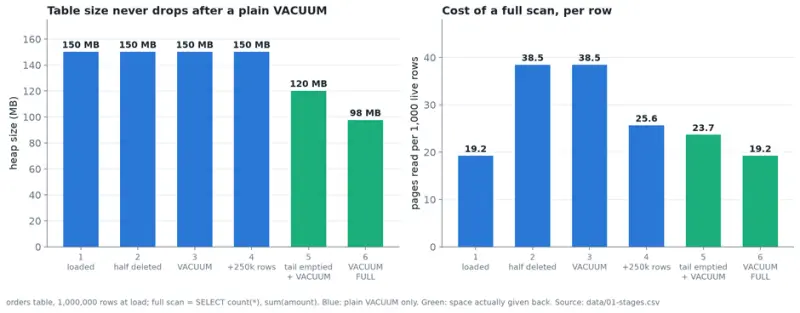
This explains why a table with no dead rows can still be nearly half empty. The space may be useful to future writes, but a full scan still has to visit the pages where surviving rows are scattered. Free space and dead tuples are different measurements; neither alone tells the whole story about whether a table needs rebuilding.
1. The table stays large after a mass delete
In one test, a one-million-row orders table occupied 150.2MB, with 30.7MB of indexes. After deleting every second row and vacuuming, the table remained 150.2MB. Dead rows fell to zero, but free space rose to 49%. A full scan still read 19,231 pages, the same count as before the delete.
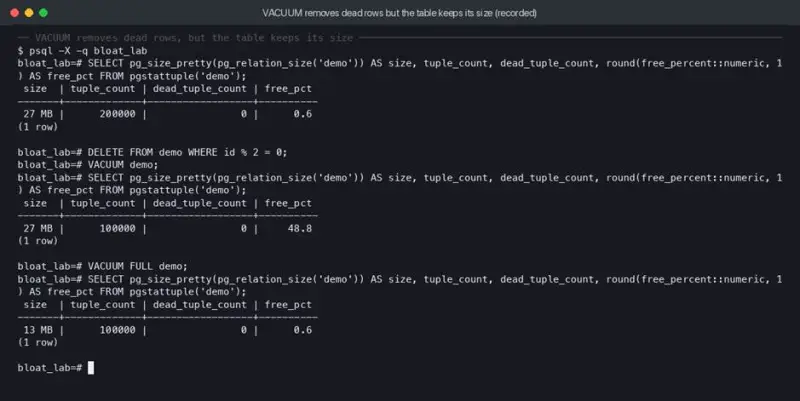
The delete was scattered across the table, so surviving rows remained spread over the same pages. Vacuuming cleaned those pages without moving the rows together. A later insert of 250,000 rows fit into the existing free space without making the table larger. That’s normal reuse at work, and it’s why a table that experiences steady churn can settle at a stable size.
When the test removed rows from the last 20% of the file, vacuuming truncated the table from 19,231 pages to 15,385. A full rewrite with VACUUM FULL reduced it further, to 97.7MB and 12,501 pages. Those results show why a mass delete doesn’t automatically justify a rewrite: if the workload will refill the space, the larger table may be serving as useful capacity.
To check free space, the PostgreSQL pg_freespace function can report available bytes by page. For broader measurements, the pgstattuple extension reports live, dead and free space. Its full scan can be costly on a large relation, so pgstattuple_approx() is a cheaper routine option; it can skip pages the visibility map marks all-visible.
A table with substantial free space and a stable size may need no action. Consider a rewrite when a one-off delete has left space the application won’t reuse, or when growth and scan costs remain a problem after the underlying cause has been addressed. For online rewriting, the article’s tests use pg_repack; VACUUM FULL is PostgreSQL’s built-in alternative, but it takes a strong lock.
2. B-tree indexes retain pages after deletes and updates
Vacuuming also removes index entries that point to dead row versions. That doesn’t mean an index file shrinks in proportion to a mass delete. A B-tree leaf page can be reused or removed only under specific conditions; if some keys remain, the page can stay in the tree with empty space around them.
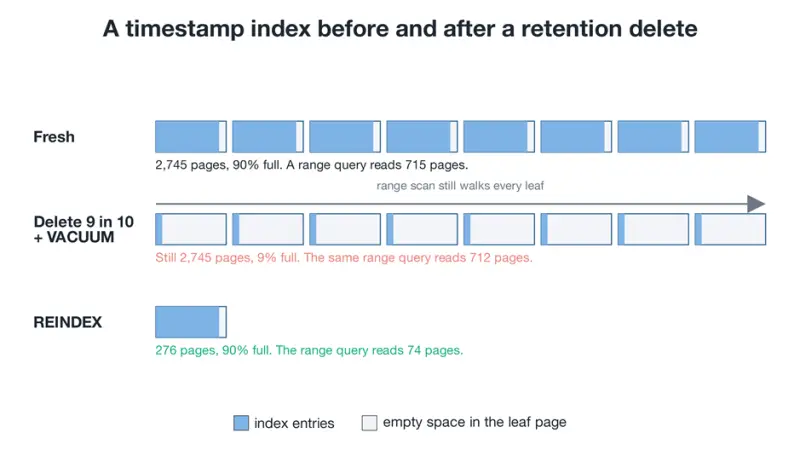
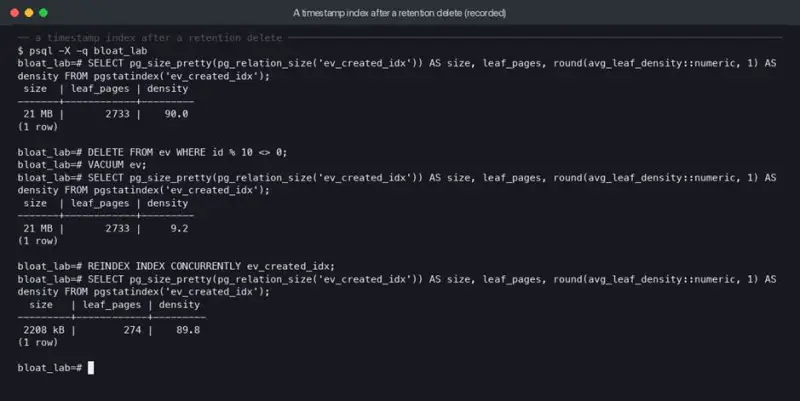
A retention test built a one-million-row table with an index on created_at, deleted nine out of every ten rows, and ran VACUUM. The index remained at 2,745 pages, while average leaf density fell from 90% to 9.2%. A query covering a three-day range read 715 pages before the delete and 712 afterward, despite returning one tenth as many rows. After REINDEX INDEX CONCURRENTLY, the index had 276 pages and the same query read 74.
Timestamp keys help explain the result. New timestamps are typically greater than older ones, so inserts go to the right side of the index. They don’t refill gaps left behind in older key ranges. A rebuild packs the surviving entries into a fresh index.
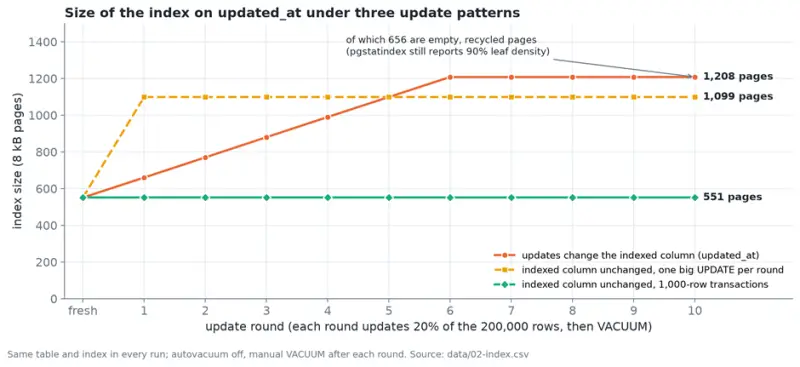
Index growth can also follow updates to indexed columns. A test updated 20% of an accounts table in each of ten rounds, changing an indexed updated_at value each time. The index grew from 551 pages to 1,208 by round six. It then stopped growing, but 656 pages were marked deleted. The live leaf pages remained near their original count and density; PostgreSQL could reuse deleted pages for later splits, but the file itself did not shrink.
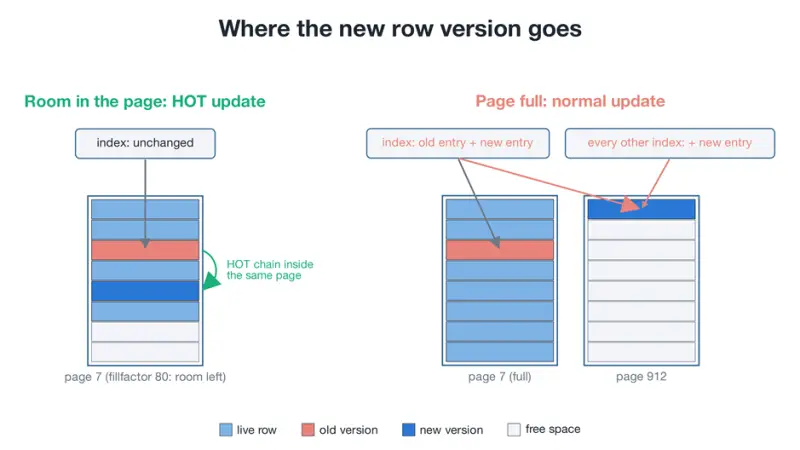
Updates that leave indexed columns alone can behave differently. PostgreSQL may perform a heap-only tuple, or HOT, update when the new row version fits on the same heap page and no indexed column changes. A HOT update avoids adding a new entry to each index. Since PostgreSQL 14, bottom-up index deletion can also remove entries for old row versions when a leaf page is about to split. Both mechanisms depend on old versions being removable.
In the experiment, 40 transactions of 1,000 updates produced HOT updates for 383,604 of 400,000 changed rows, or 96%, and the index did not grow. With one large update per round, the first round doubled the index to 1,099 pages. The old row versions were not yet dead because the transaction that created them had not committed. Write transaction size and commit timing can therefore affect index growth as well as the table design.
Use pgstatindex, from pgstattuple, to inspect B-tree pages, including leaf_pages, deleted_pages and avg_leaf_density. A large deleted-page count, an index growing much faster than its table, or increasing buffer reads for a range scan can justify closer inspection. Since pgstatindex reads the index, run it off-peak or against a replica when the index is very large.
REINDEX INDEX CONCURRENTLY builds a replacement alongside the existing index and swaps it in without blocking ordinary reads and writes for the full build. It takes longer than a plain reindex and needs enough disk space for a second copy. It must run outside a transaction block. A long-running transaction can delay it, and a failed or cancelled operation may leave an invalid index that still adds work to writes. Check for invalid indexes with SELECT indexrelid::regclass FROM pg_index WHERE NOT indisvalid, then drop any that need removal. Rebuild large indexes one at a time to manage I/O and WAL generation.
For prevention, review indexes on columns that change frequently. An index on a timestamp updated on nearly every write can prevent HOT updates and continue growing even when vacuuming is frequent.
3. Autovacuum can start too late on a large table
Autovacuum is driven by thresholds. With the defaults described in the test, the trigger is calculated as the fixed threshold plus a scale factor multiplied by the estimated row count:
vacuum threshold =
  autovacuum_vacuum_threshold
  + autovacuum_vacuum_scale_factor × reltuples
The default values in the test were a threshold of 50 and a scale factor of 0.2. That puts the trigger at 400,050 dead rows for a table with two million rows, and 40 million for a table with 200 million rows. PostgreSQL 18 adds autovacuum_vacuum_max_threshold, which caps the trigger at 100 million by default.
A seven-minute test applied four workers to a two-million-row sessions table, with 300MB of heap and 56MB of indexes. They updated 2,000 random rows per second in small transactions, setting last_seen and incrementing a counter. With defaults, autovacuum started after the dead-row count passed 400,050, at about 206 seconds. It took roughly 45 seconds to process the table; the peak reached 489,294 dead rows.
With per-table settings, autovacuum ran seven times in the same period, each run taking around five seconds. Peak dead rows fell to 125,211. The test used a 0.01 scale factor, a threshold of 1,000 and a cost limit of 2,000:
ALTER TABLE sessions SET (
  autovacuum_vacuum_scale_factor = 0.01,
  autovacuum_vacuum_threshold = 1000,
  autovacuum_vacuum_cost_limit = 2000
);
Heap size rose from 301MB to 309MB with defaults and to 306MB with the per-table settings. Index size rose from 56MB to 73MB in both runs. Every update changed the indexed last_seen column, so none of the 840,000 updates could be HOT. The test therefore shows both the benefit and the limit of vacuum tuning: more frequent cleanup lowered the dead-row backlog, but it didn’t stop index entries accumulating for updates to an indexed column.
Even tuned autovacuum left around 120,000 dead rows before a run. The server’s default autovacuum_naptime is 60 seconds, and the launcher checks each database on that schedule. At 2,000 updates a second, another 120,000 updates can happen between checks. Reducing a table’s scale factor cannot make the launcher look more often than its naptime.
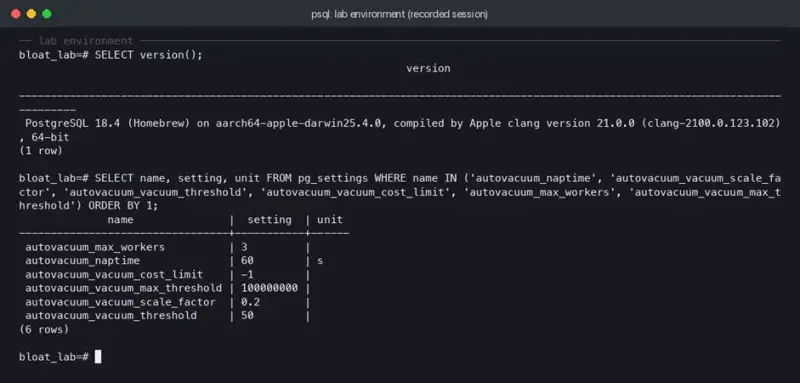
Three settings shape how quickly a table gets cleaned: the scale factor and threshold determine how much dead data triggers a run; autovacuum_naptime controls how often the launcher checks; and the cost limit and delay influence how quickly a worker proceeds. The tested defaults also included a cost limit of 200 (through the global vacuum_cost_limit because autovacuum_vacuum_cost_limit was -1), a 2ms cost delay and three maximum workers.
Monitor pg_stat_user_tables for dead-row counts, dead-row percentage and time since the last autovacuum. A rising backlog between runs, an unexpectedly old last_autovacuum, or a table appearing in pg_stat_progress_vacuum for extended periods can signal that cleanup is falling behind. Tune the busiest tables individually first. A scale factor between 0.01 and 0.05, with a fixed threshold suited to the table’s size, is a starting point from the tests. If the hottest tables outpace the launcher, consider a shorter naptime or more workers; workers share the cost limit.
4. An old snapshot can hold back cleanup across the database
Frequent vacuuming still cannot remove a row version that an active transaction might need. PostgreSQL tracks the oldest snapshot in use, often called the xmin horizon. Until that horizon advances, vacuuming may report rows as “dead but not yet removable.” This can affect tables throughout the database, not just the table queried by the session holding the snapshot.
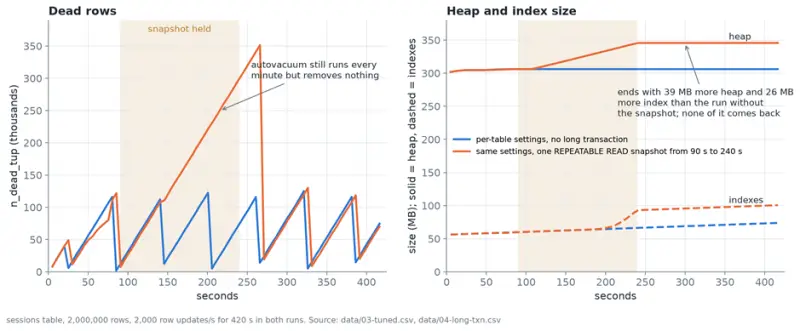
In a test with the same tuned workload, a separate session opened a REPEATABLE READ transaction at 90 seconds, took a snapshot with a query and then sat idle until 240 seconds. A manual VACUUM scanned the table but removed zero tuples; it reported 219,892 rows as dead but not yet removable. Autovacuum still ran during the test, but could not clear those rows while the snapshot remained open.
While the transaction was open, updates that could not find reusable space extended the heap from 306MB to 345MB and indexes from 60MB to 93MB. When the report ended, a subsequent autovacuum cleared the backlog. The files did not shrink, though: the run finished with 39MB more heap and 26MB more index than the version without the long transaction.
Long-running transactions are a common cause, including reporting jobs that open a transaction and then spend time processing results. Other possibilities include abandoned replication slots, forgotten prepared transactions, and a standby using hot_standby_feedback. Long queries on a replica using that setting can hold back cleanup on the primary.
When vacuum reports rows that are not yet removable, inspect sessions, replication slots and prepared transactions. These queries list the oldest session snapshots, slot horizons and prepared transactions:
SELECT pid, usename, application_name, state, backend_xmin,
       age(backend_xmin) AS xmin_age,
       now() - xact_start AS transaction_age,
       left(query, 60) AS last_query
FROM pg_stat_activity
WHERE backend_xmin IS NOT NULL
ORDER BY age(backend_xmin) DESC
LIMIT 10;

SELECT slot_name, active, xmin, catalog_xmin, age(xmin) AS xmin_age
FROM pg_replication_slots;

SELECT gid, prepared, owner, database
FROM pg_prepared_xacts;
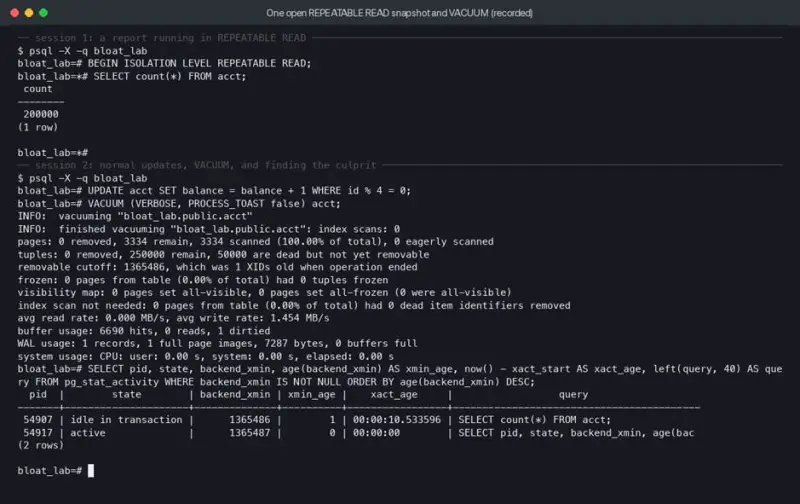
In the test, the first query identified an idle-in-transaction report whose snapshot was 4,397 transactions behind. Keep application transactions short, and consider setting idle_in_transaction_session_timeout for application and reporting roles. PostgreSQL 17 added transaction_timeout, which can cap transaction duration. Role-level settings can account for legitimate batch work that needs a longer window.
Review old replication slots and long reports as part of the same investigation. If a session or slot is responsible, resolve it using the appropriate operational process. Simply increasing vacuum frequency won’t clear versions that the oldest snapshot still needs.
When a lower fillfactor helps
A lower table fillfactor reserves space on pages for future row versions. That space can help an update qualify as HOT when the changed columns are not indexed and the new version fits on the same page. It cannot make an update HOT if the update changes an indexed column.
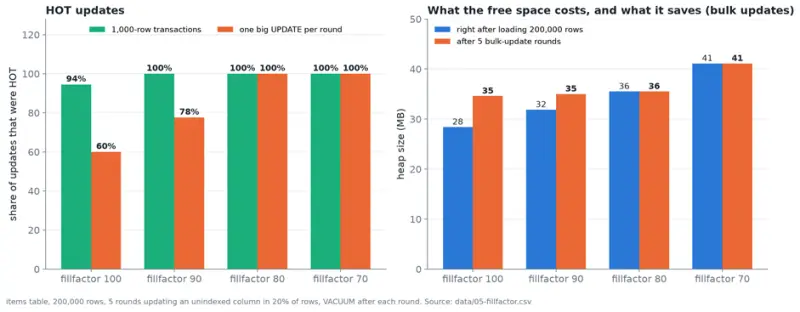
A test compared fillfactor values of 100, 90, 80 and 70 on a 200,000-row table. It ran five update rounds, changing an unindexed stock column in 20% of rows each time, with a vacuum after each round. The updates were tested as small transactions of 1,000 rows and as one large statement per round.
For the small transactions, a fillfactor of 100 already produced 94.5% HOT updates because page pruning made space available as the workload progressed. A fillfactor of 90 raised the HOT rate to 100% and kept the heap from growing, but the table started 12% larger. In the large-update pattern, fillfactor had more effect: the HOT rate rose from 60% at 100 to 78% at 90 and 100% at 80 or 70. At fillfactor 100, the heap grew 22%; at 80, it did not grow during the updates, but started 25% larger.
When the test changed an indexed category column instead, HOT updates fell to 0% at both 100 and 70. The lower setting left more unused space without enabling HOT updates. That’s the key limit: reserved room can help with page placement, but it cannot overcome an indexed-column change.
Consider a fillfactor between 80 and 90 for tables with large batches of updates to non-indexed columns, or rows that are updated soon after insertion. A value of 100 may remain suitable for insert-only tables and tables whose updates change indexed columns. Compare n_tup_hot_upd with n_tup_upd in pg_stat_user_tables to see how the workload responds.
ALTER TABLE ... SET (fillfactor = 90) affects pages written after the change; it doesn’t repack existing pages. A rewrite is required to apply the new setting throughout the existing table. Check the current storage parameters before using pg_repack, which carries them over to its replacement table.
A practical order for diagnosing and fixing bloat
Start by preventing new growth, then measure the existing space and identify whether it will be reused. Rebuilding first can provide a short-term reduction, but the same workload may recreate the problem.
- Tune active tables. Set per-table autovacuum thresholds and cost limits for tables whose dead-row backlog is growing. Address long transactions and unused slots that hold back the
xminhorizon. Review indexes on columns that change on most writes. - Measure before choosing a rewrite. Use
pgstattuple_approx()for a regular check of larger tables, and compare heap and index sizes with dead and free space. A weekly query can focus on tables over 10MB and sort by size. Usepgstatindexto investigate large indexes. The table’s write history matters: 30% free space may be useful, intentional or stranded. - Rebuild indexes when they’re materially larger than needed.
REINDEX INDEX CONCURRENTLYis often a narrower operation than rewriting a whole table. Allow for a second index copy, I/O and WAL, and check for invalid indexes if a rebuild fails. - Rewrite tables only when free space won’t be reused.
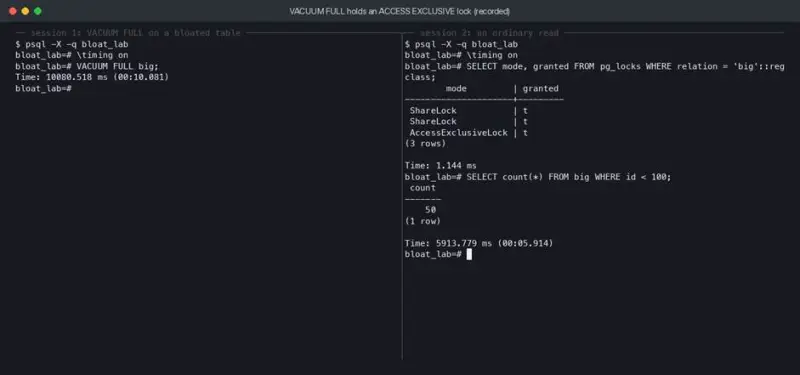
VACUUM FULLrewrites the table but takes anAccessExclusiveLock. In a test on a four-million-row table with half its rows deleted, it blocked a regularSELECTfor 5.9 seconds while the operation took 10 seconds. On a larger production table, the lock could last much longer.
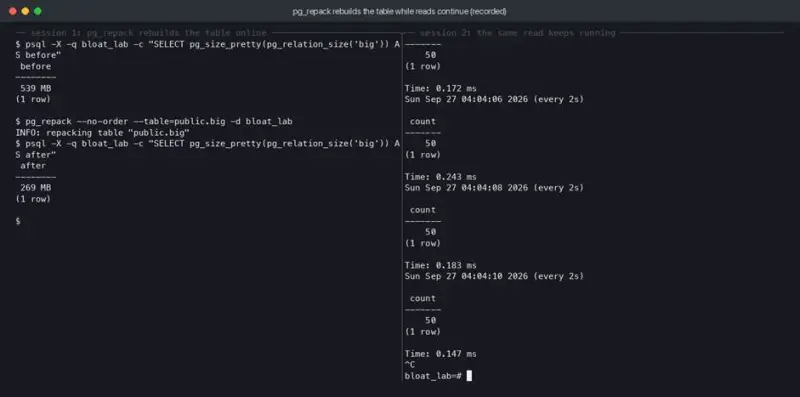
pg_repack rewrites a table while allowing ordinary reads and writes through most of the operation. It copies the table, logs changes made during the copy, replays them and swaps the files. The test reduced a table from 539MB to 269MB while queries continued, with no read taking longer than 2.5ms. That result describes the test setup, not a guarantee for every workload.
Repacking still requires the extension and a matching client, sufficient disk for a copy of the table and indexes, and a primary key or unique index on non-NULL columns. It is normally run with elevated database privileges. Long-running transactions can delay its brief locks, so schedule the work around reporting activity. Since it preserves storage parameters, check the table’s fillfactor first: in the test, repacking with fillfactor 70 produced a 391MB table with 31.4% free space, compared with 269MB at the default setting.
The decision is easiest to make by matching the symptom to its cause. A growing dead-row count points toward autovacuum capacity or thresholds. “Dead but not yet removable” points toward an old snapshot or another horizon holder. High free space with no dead rows may be normal if writes will reuse it. Free space left by a one-time retention delete may call for a rewrite. A large index with many deleted pages may call for a concurrent reindex. A low HOT rate on updates to non-indexed columns may justify testing a lower fillfactor.
For teams reproducing the measurements, the lab uses PostgreSQL contributor extensions pgstattuple, pageinspect and pg_freespacemap, plus pg_repack 1.5.3 for online table rebuilding. The scripts use PostgreSQL 18.4 and Python 3.10 or later for the load generator. Exact measurements vary across systems, but the practical distinction remains: vacuuming makes eligible space reusable, while compaction requires the right pages to be truncated or the relation to be rebuilt.
Track free space, index structure, vacuum cadence and snapshot age alongside dead-row counts. Then rebuild only the space the workload won’t reclaim, after correcting the condition that created it.


