Microsoft Purview Splits Copilot Interaction and Memory Retention
- Tony Redmond
- 588 views
Older Teams retention policies will stop processing Copilot interactions in late October 2026; admins should create a separate Copilot policy.
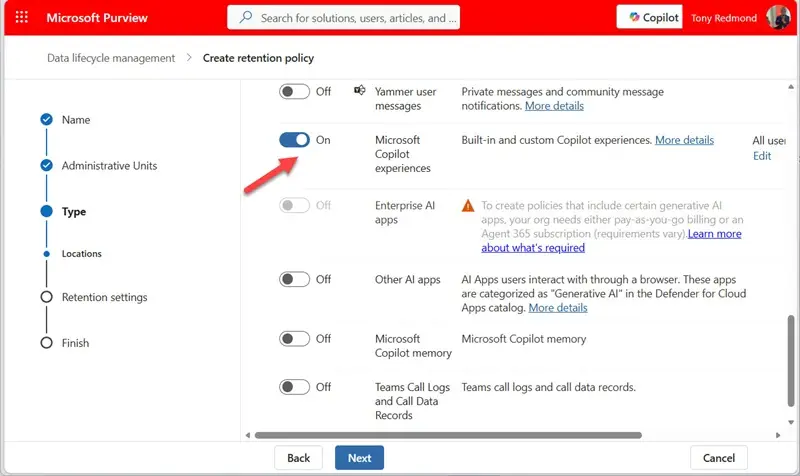
Microsoft 365 admins with older Teams retention policies have a change to prepare for: starting in late October 2026, those policies will stop processing Copilot interactions. Teams chats and Copilot records will need separate Purview retention policies. Microsoft is also adding retention support for Copilot memory, giving compliance teams a way to access earlier versions of memory items.
Move Copilot interactions to a separate policy
Message center notification MC1481313, dated 28 September 2026, describes the change to Teams retention. When Copilot first arrived, Microsoft stored its prompts and responses as compliance records in the hidden TeamsMessagesData folder in user mailboxes. Reusing Teams chat retention policies was a quick way to cover those records. The arrangement is changing as Copilot data gets its own retention controls.
Microsoft had announced plans to separate Copilot and Teams compliance records in November 2024. Purview subsequently gained the ability to create distinct retention policies for each data type, but older policies may still cover both. Microsoft is now removing Copilot processing from those older Teams policies. If a tenant relies on one of them to retain Copilot records, its administrators need to create a retention policy for Copilot experiences.
The new policy applies to interactions captured from both free and paid Copilot clients. That scope makes it important to check which clients people in the tenant use and whether existing retention settings cover their interactions. A Teams policy continuing to retain chat data won’t, by itself, ensure Copilot interactions remain covered after Microsoft makes the change.
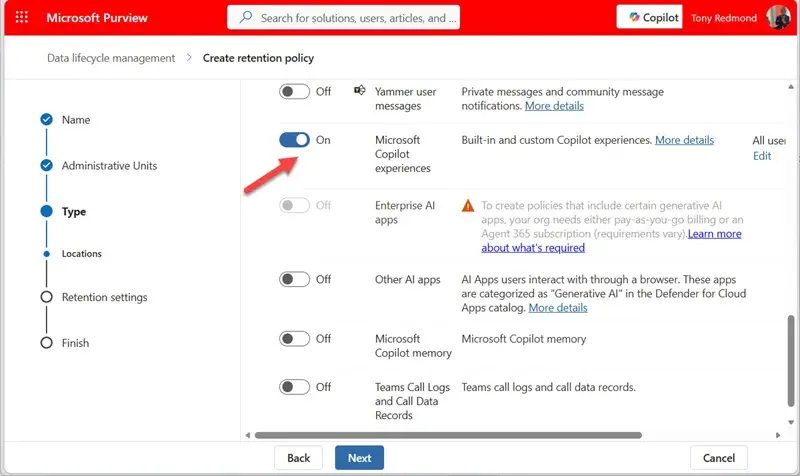
The rollout is scheduled to start in late October 2026 and finish by mid-November 2026. Admins can use that window to identify older policies that include Copilot, establish the separate policy, and review how the change affects their retention coverage. The key operational detail is the policy boundary: Copilot interactions are moving out of Teams retention processing.
Retention support is coming for Copilot memory
A separate change adds Purview data lifecycle management support for Microsoft 365 Copilot memory. Message center notification MC1478965, dated 24 September 2026, covers the update and points to Microsoft 365 Roadmap item 569612. The rollout is expected to begin in late September 2026 and complete by mid-October 2026.
Copilot memory helps personalize responses using saved memories, details inferred from chat history, and custom instructions. Microsoft describes these as information used to provide “personalized and context-aware Copilot experiences.” Memory settings are stored in a hidden folder in the user’s Exchange Online mailbox.
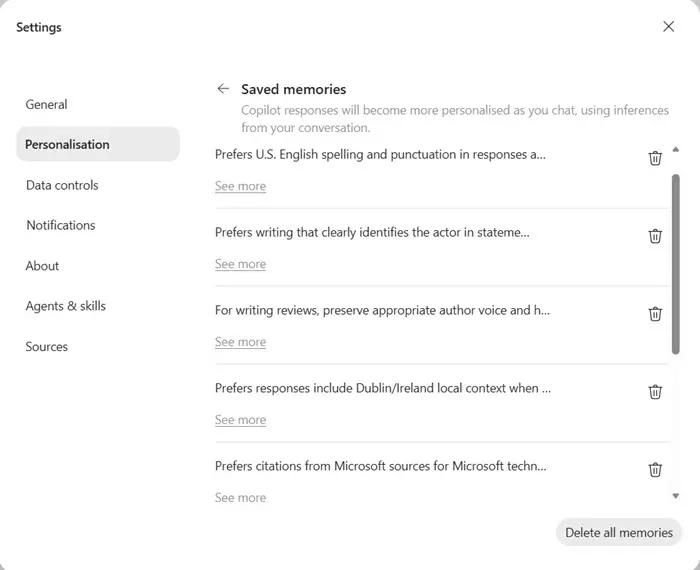
With the new retention support, compliance teams will be able to access historical versions of Copilot memory items through eDiscovery searches and exports. Microsoft hasn’t described the underlying file format or the specific contents administrators should expect to find. The practical change is that those memory records will have a lifecycle management path in Purview, and earlier versions will be available for review.
That history could help teams understand how an individual’s stored Copilot context changed over time. What a particular memory record will show, and how useful it will be in a review, depends on its contents; Microsoft has not provided further detail. For administrators, the immediate step is to note that Copilot memory is separate from the interaction records covered by the new Copilot experiences policy.
Outlook themes and mailbox access
Another notice, MC1492954, dated 9 October 2026, announces the retirement of Copilot themes in Outlook. When Outlook generated a custom theme based on details such as weather or location, the Microsoft 365 substrate created a Copilot compliance record. Removing themes should therefore reduce the number of Copilot records Purview processes, though the notice is separate from the retention changes for interactions and memory.
Inspecting the hidden mailbox folders may also be harder for tenant administrators. Microsoft previously blocked Graph access to non-IPM folders, and MFCMAPI can now identify TeamsMessagesData but cannot open its contents table to display the items. Administrators who used MFCMAPI to confirm that a compliance record existed will find that route limited.
Copilot interaction details remain accessible through the aiInteractionHistory Graph API, although using it takes more effort for a quick existence check. Teams preparing to validate retention should account for that access constraint and use the available API when they need to retrieve interaction details. The main work is straightforward: review older Teams policies, create separate Copilot retention coverage, and track the memory rollout through its stated completion window.


