Microsoft AuditLogQuery Migration Requires PowerShell Script Changes
- Tony Redmond
- 654 views
AuditLogQuery uses queued jobs and changes record properties and AuditData handling, so Search-UnifiedAuditLog scripts need careful updates and testing.
Moving Microsoft 365 audit scripts from Search-UnifiedAuditLog to the AuditLogQuery API changes how queries run and how their results are represented. Administrators should plan for code updates and output checks: this is a job-based workflow, and property names and AuditData formats differ. A direct cmdlet substitution is unlikely to preserve a script’s behavior.
Expect an asynchronous query workflow
Search-UnifiedAuditLog processes a query synchronously and returns records in the same call. AuditLogQuery instead queues a job for Microsoft Purview Audit to process. A script submits the request, checks the job status, and retrieves the records after processing finishes.
Processing can take ten minutes or longer, depending on service load and the number of requested records. That affects scripts built for quick checks, such as finding when a user last created a file or email. Those scripts must wait for the audit job or use another available method.
Microsoft Graph PowerShell SDK cmdlets can help create and retrieve these jobs, but the migration involves more than replacing an Exchange Online cmdlet with a Graph cmdlet. Scripts may need changes to permissions, query parameters, result handling, and any supporting data they fetch. AI tools can assist with an initial rewrite, but each script still needs manual review and testing.
Audit records vary by workload
The unified audit log captures user activity and internal system actions across Microsoft 365 workloads. Every record includes core fields such as the operation, timestamp, and actor. The workload-specific AuditData field holds much of the detail administrators need, but its contents vary between workloads.
Some records, such as those from SharePoint Online, are relatively straightforward to interpret. Others can be harder to parse; Entra ID license assignment records, for example, can include product SKU details. A conversion therefore needs to account for the particular workloads and fields that the script examines. A query may return records successfully while downstream parsing still fails or misses values.
Update field names and AuditData handling
AuditLogQuery changes several audit record header names used by Search-UnifiedAuditLog. For example, UserIds maps to UserPrincipalName, Operations to Operation, and CreationDate to CreatedDateTime. The Graph names align with conventions used elsewhere in Graph, but scripts must be updated wherever the old names appear.
The format of AuditData also depends on how the records are retrieved. With a Graph API request, it is a PowerShell object whose fields can be accessed directly, such as $Rec.AuditData.SiteUrl. That differs from the JSON returned by Search-UnifiedAuditLog, which scripts commonly parse with:
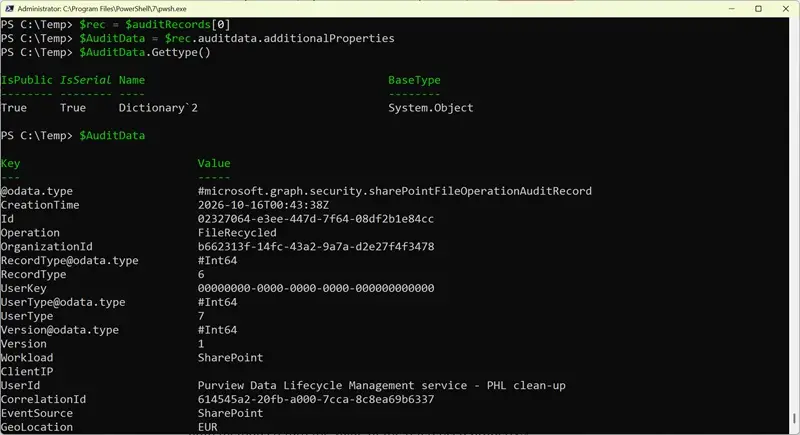
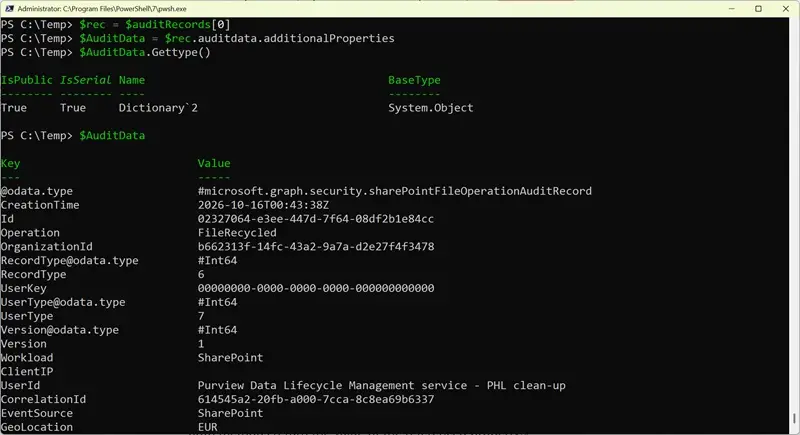
[array]$AuditData = $Rec.AuditData | ConvertFrom-JsonWhen Get-MgSecurityAuditLogQueryRecord retrieves records, AuditData is exposed through its additionalProperties property. That property contains a dictionary of name/value pairs because the fields are not strongly typed in the Graph SDK model. A script can assign the dictionary and read a value like this:
$AuditData = $Rec.AuditData.additionalProperties
$AuditData.SiteUrl
$AuditData["SiteUrl"]
Both access styles can return the value. Use the exact property name as it appears in the dictionary: SiteUrl works, while siteUrl does not. Check casing as well as spelling when adapting existing field references.
Plan the conversion in stages
A typical migration starts by establishing an interactive or app-only Graph session with the required permissions. AuditLogsQuery.Read.All permits access to audit events across workloads. The query parameters can be supplied as named parameters to New-MgSecurityAuditLogQuery, or as properties in a request body when calling the Graph API directly. API requests require a request body.
Several familiar Search-UnifiedAuditLog parameters have corresponding Graph parameters, but their names change. For instance, UserIds becomes UserPrincipalNamesFilter; StartDate and EndDate become filterStartDateTime and filterEndDateTime; and Operations maps to operationFilters. Other mappings include RecordType to recordTypeFilters, ObjectIds to objectIdFilters, FreeText to keywordFilter, and IPAddresses to ipAddressFilter. Graph also offers AdministrativeUnitIdFilters, which has no equivalent parameter in the older cmdlet.
Some older parameters, including ResultSize, SessionId, and SessionCommand, are not used by the Graph API. After defining the query, submit the job, monitor its status until processing completes, retrieve the records into an array, and then extract the fields the script needs. Organizations that standardize audit searches on UTC should preserve that practice when setting the start and end times.
Check dependencies and record limits
Migration work can extend beyond the audit query itself. A script might use Get-ExoMailbox to build a lookup of user principal names and display names. If the script now runs its audit work through Graph, it may need equivalent mailbox data from Get-MgUser.
A working example, Report-NonUserAuditEvents.PS1, contains code for both approaches. It retrieves audit records for the previous seven days and filters out actions performed by tenant users before analyzing system events. In larger tenants, the query period may need to be shorter to stay within the 50,000-record limit cited for Search-UnifiedAuditLog.
Before relying on a converted script, check that its query parameters, permissions, property names, and AuditData parsing match the records it receives. The queued processing model also means its runtime expectations may need revision. Those checks will show whether the migration preserves the script’s intended results.


