Microsoft to Retire Copilot Prioritize My Inbox by March 2027
- Tony Redmond
- 1,004 views
Microsoft will remove Copilot Prioritize My Inbox by March 2027. The change affects users with access to the feature, typically through Microsoft 365 Copilot licences.
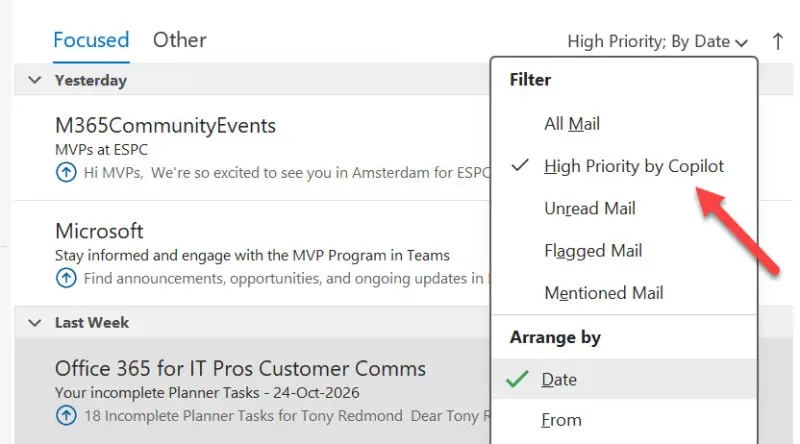
Microsoft is winding down Copilot Prioritize My Inbox, a feature that marked selected Outlook messages as high priority. The removal process began on October 26, 2026, and is scheduled to finish by the end of March 2027. After the change reaches a user’s Outlook client, the feature will disappear from its menus without action from the user or an administrator.
The timeline and behavior are described in message center notification MC1519861, updated 22 October 2026. Microsoft says the retirement will simplify the Outlook Copilot experience and let it focus ongoing investment elsewhere. The change applies to people who currently have access to Prioritize My Inbox; in practice, that means users with Microsoft 365 Copilot licences.
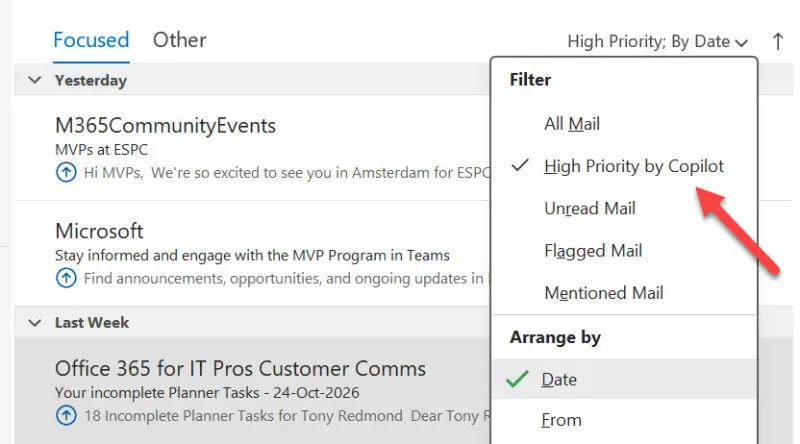
For tenant teams, the practical point is that this is a feature removal, not a change that requires a migration or a setting adjustment. The notice says the option will disappear from Outlook menus as withdrawal progresses. Users who rely on it should plan for that option to go away by the end of March 2027 and consider whether their existing inbox habits depend on Copilot’s priority markings.
Another attempt to sort the Inbox
Prioritize My Inbox sits in a long line of Microsoft efforts to separate important email from the rest. The earliest example in this history was Clutter, first shown at the revamped Microsoft Exchange Conference in late 2012. Instead of creating a second view within the Inbox, Clutter moved messages it judged unimportant into a separate Clutter folder. It learned from user behavior and later allowed people to provide instructions to improve its decisions.
Clutter reached Outlook Web App in late 2014, with Microsoft continuing to adjust it over the following couple of years. Its promise was straightforward: spend less time sorting incoming mail. Its weakness was harder to address. Users could not always tell why a message had been moved, and it wasn’t easy to predict what the system would do next. With current AI tools now part of everyday software, the techniques behind Clutter can look dated; at the time, its unpredictable sorting was already a source of frustration.
Focused Inbox took a different route
Microsoft’s next prominent approach came with its move into mobile email. After buying Acompli, Microsoft rebranded the app as Outlook for iOS and Android in early 2015. Focused Inbox became a central feature of the new mobile client and later spread across Outlook clients. Outlook desktop was the last to receive it, in 2017.
Focused Inbox keeps messages in the Inbox but divides them between Focused and Other views. Those views filter the folder according to a message property, rather than moving messages into another folder. Users can train the feature by moving incorrectly sorted mail between the two views. That process may take time, but it gives people a way to correct the system’s choices as they encounter them.
For some users, that repeated feedback has made Focused Inbox useful. Others remain wary of its decisions and see it as another opaque filter. The feature has persisted alongside Copilot Prioritize My Inbox, leaving Outlook with two ways to draw attention to messages. That overlap makes the retirement of a single-purpose prioritization tool easier to understand, even for users who found it helpful.
What could replace message-by-message priority?
Microsoft’s stated explanation is that it wants to simplify the Outlook Copilot experience and focus its ongoing investment. The retirement also fits a wider shift in how Copilot appears across Office apps: Microsoft has been working to make Copilot Chat more integrated, while products such as Copilot Cowork and Autopilot, also known as Microsoft Scout, point toward assistants that can carry out tasks for users.
Inbox prioritization could suit that kind of assistant. A user might describe in natural language which messages deserve attention and have an assistant apply those preferences as new mail arrives. That would be more flexible than a feature that simply marks messages Copilot considers important. But the key question for administrators and users is how clearly such a system would explain its choices and how easily people could correct them. “Important” depends on a person’s work, responsibilities and relationships, so a useful assistant would need to reflect those preferences rather than leave users guessing.
For now, the change is limited to the withdrawal of Prioritize My Inbox. Microsoft’s timeline gives users and IT teams until the end of March 2027 to adjust their expectations. Teams can check whether people rely on Copilot’s priority markings, then watch for any further details Microsoft provides about the Outlook experience that will take its place.


