Microsoft 365 Copilot DLP Rules Can Now Link to Tenant Guidance
- Tony Redmond
- 593 views
A new compliance URL lets Copilot DLP rules send users to internal guidance when access to content is blocked. Changes take about 30 minutes to apply.
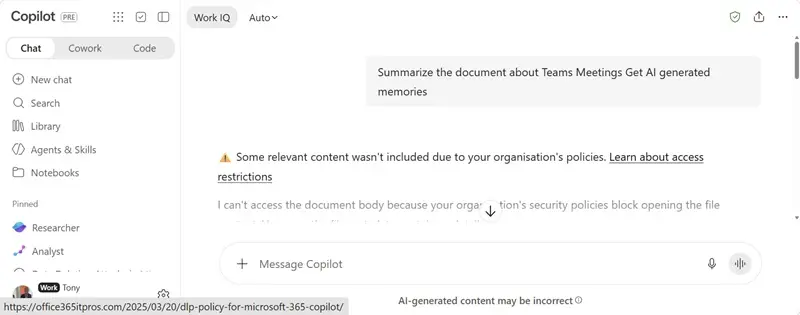
When a Microsoft 365 Copilot data loss prevention (DLP) rule blocks access to content, organizations can now point users to their own guidance instead of Microsoft’s general documentation. The option gives administrators a way to explain a restriction in the context of their organization, while Microsoft continues to control the message text shown in Copilot.
The capability is available worldwide, according to Microsoft message center notification MC1478467, dated 24 September 2026. It applies wherever a Copilot integration or app displays a notice that content wasn’t available because of organizational policy. That includes Copilot Chat when it tries to use a document to ground a prompt.
What users see when a rule blocks content
When DLP prevents Copilot from opening a document, Copilot tells the user that some relevant content wasn’t included because of organizational policy. The message includes a link intended to explain the access restriction.
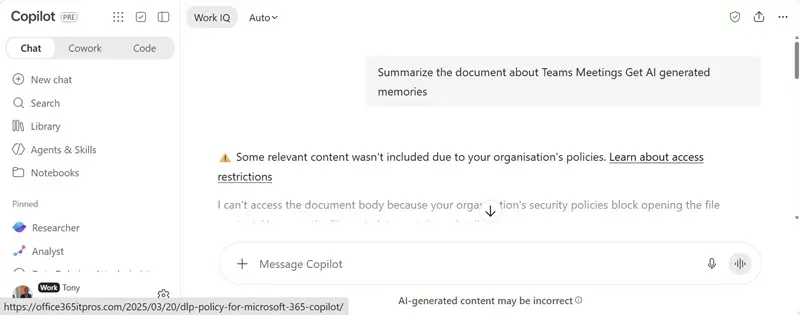
Previously, tenants couldn’t change the destination: users were sent to Microsoft’s DLP documentation for Microsoft 365 Copilot. Administrators can now configure that link to lead to an internal compliance page, data governance material, or support instructions. The wording of Copilot’s message remains fixed by Microsoft, so the change affects where the link leads, not what the notice says.
That distinction matters in practice. A general explanation can tell someone that access was restricted, but an organization’s own guidance can identify where to ask for help or how to handle the content. Microsoft describes the change as a way for organizations to provide policy-specific guidance while keeping the user experience consistent and localized.
The link setting isn’t limited to Copilot Chat. It applies in Copilot integrations and apps that display a message when DLP blocks content. The scope of Copilot DLP has also expanded beyond Microsoft 365 storage locations to include Office files stored elsewhere, as described in a separate update to Copilot DLP coverage.
Configure the compliance URL in a DLP rule
Administrators configure the destination in the DLP rule. The rule needs to display policy tips; under its policy tip settings, enable the option to show a custom “compliance URL” and enter the organization’s destination.
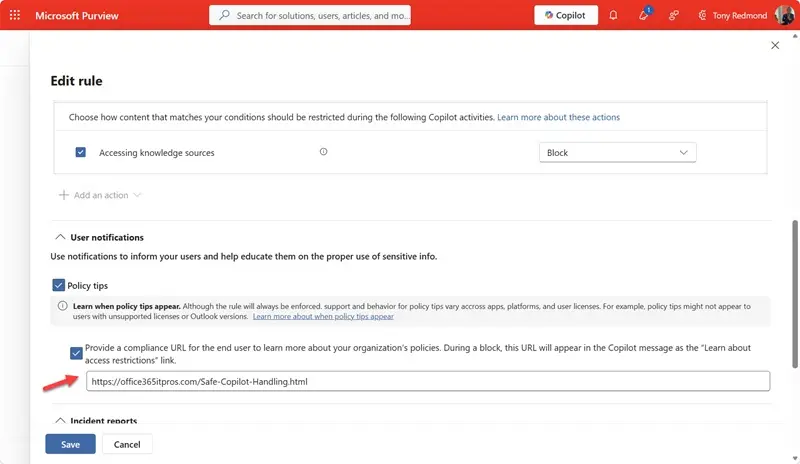
After saving the rule, Microsoft says the new link should take effect in about 30 minutes. That timing reflects a reduction in tenant DLP synchronization from roughly two hours to about 30 minutes, described in MC1317834. Once the updated rule is active, a Copilot attempt to access blocked content produces an error message with the configured link.
The feature is currently in public preview. General availability is scheduled for December 2026. Administrators planning to use it should account for the preview status and check the behavior in their own tenant before relying on the new destination for user support.
Keep guidance consistent across rules
A Copilot action can match more than one DLP policy or rule. When that happens, Copilot uses the link associated with the “winning rule.” If different rules point users to different pages, people may receive inconsistent guidance depending on which rule applies.
Using the same compliance information across Copilot DLP rules can make the experience easier to understand. Teams might direct users to a central page that explains access restrictions and provides a support route, then maintain that page as policies or procedures change. The link is optional, so tenants satisfied with Microsoft’s documentation can leave their existing rules as they are.
This is a small configuration change, but it gives administrators more control over the next step users take after a DLP block. Review the policy tips on Copilot DLP rules, choose a destination that answers the questions users are likely to have, and check that the rules point to consistent guidance.


