Entra ID Hard Deletion Protection Adds a Seven-Day Recovery Window
- Tony Redmond
- 583 views
Entra ID can block permanent deletion of protected objects for seven days. Check supported object types, Graph tooling gaps and audit details before enabling it.
Entra ID’s Hard Deletion Protection adds a seven-day hold before certain deleted directory objects can be permanently removed. For administrators, the value is straightforward: an accidental action or a compromised account can’t immediately erase a protected object from the recycle bin. The main decision is whether to enable protection on the right objects, since the setting is permanent once applied.
What the seven-day hold changes
When an administrator deletes an object through the Entra admin center or Microsoft Graph, it is soft-deleted and remains recoverable for up to 30 days. An administrator can also hard-delete it from the recycle bin before that period ends. Hard deletion is permanent.
Hard Deletion Protection changes that sequence for supported objects. An administrator enables the isHardDeleteProtectionEnabled property while the object is active. If the protected object is later soft-deleted, Entra ID blocks attempts to hard-delete it for seven days. After the hold expires, permanent deletion is available as usual.
The property cannot be switched off after it is enabled. That makes the setting a lasting safeguard for objects where an extra recovery window is worth the operational constraint. If a protected object is restored, it keeps the protection. Should it be deleted again, a fresh seven-day period begins.
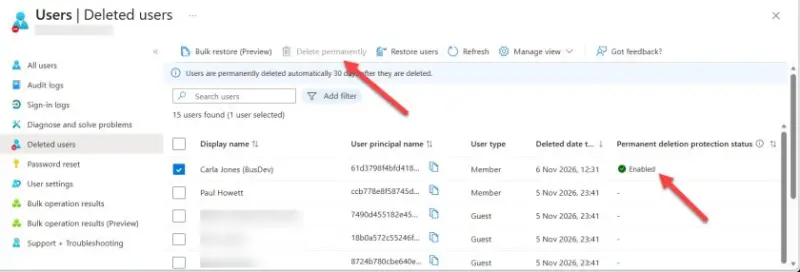
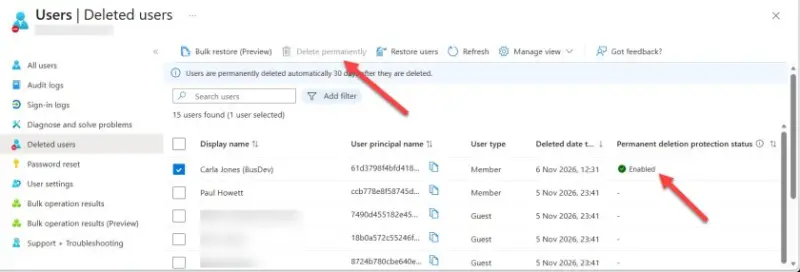
In the Entra admin center, the “Delete permanently” option is greyed out for a protected item in Deleted users. The portal also displays the protection state in the Permanent deletion protection status column.
Which directory objects are supported
The documented scope covers cloud-only user accounts, including guest accounts; cloud-only Microsoft 365 groups and security groups; tenant-owned app registrations; and service principals, including those for enterprise applications such as the Microsoft Graph PowerShell Command Line tools.
There are important exclusions. User accounts synchronized from on-premises Active Directory aren’t supported. The documented explanation is that their lifecycle is controlled by Active Directory. Mail-enabled security groups and distribution groups also fall outside the supported group types. Service principals associated with Azure Automation accounts can’t be protected either, despite their potential importance to a tenant’s operations.
This scope makes the feature useful for protecting selected identities and application objects from permanent removal. It can limit damage if a privileged employee deletes accounts deliberately, or if an attacker tries to remove administrator accounts while leaving one account under their control. The hold buys time for recovery; it doesn’t prevent soft deletion in the first place.
Enable protection through the portal or Graph
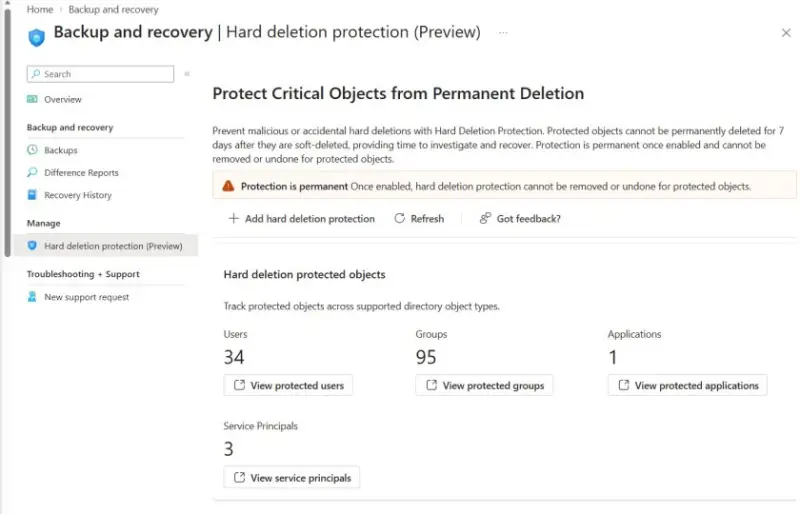
Administrators can set the property in the Backup section of the Entra admin center or update it programmatically. Portal selection may be adequate for a small number of objects. For larger groups, Microsoft Graph requests can reduce repetitive work, but the current Microsoft Graph PowerShell SDK metadata in version 2.41.2 doesn’t fully expose the feature. The examples therefore use beta cmdlets alongside direct Graph requests.
This example enables protection on one user with the beta SDK cmdlet:
$Params = @{
isHardDeleteProtectionEnabled = $true
}
Update-MgBetaUser -UserId [email protected] -BodyParameter $Params
A loop can apply the same setting to licensed, enabled member accounts:
[array]$Users = Get-MgUser -Filter "assignedLicenses/`$count ne 0 and userType eq 'Member' and accountEnabled ne false" -ConsistencyLevel eventual -CountVariable UsersFound
ForEach ($User in $Users) {
Update-MgBetaUser -UserId $User.Id -BodyParameter $Params
}
This sample doesn’t check whether the signed-in account can manage members of restricted management administrative units. Updates to objects outside its permissions can return errors, so administrators should account for those failures when reviewing the result.
To apply protection to teams, the example retrieves the tenant’s teams and updates each corresponding group:
[array]$Teams = Get-MgTeam -All
ForEach ($Team in $Teams) {
Update-MgBetaGroup -GroupId $Team.Id -BodyParameter $Params
}
Verify the setting and account for paging
The Get-MgBetaUser cmdlet doesn’t yet return the protection property. A direct beta Graph request can read it for an individual user:
$Uri = "https://graph.microsoft.com/beta/users/[email protected]"
$Data = Invoke-MgGraphRequest -Uri $Uri -Method GET -OutputType PsObject
$data.isHardDeleteProtectionEnabled
To list enabled protected member accounts, filter the users endpoint:
$Uri = "https://graph.microsoft.com/beta/users?`$filter=isHardDeleteProtectionEnabled eq true and accountEnabled eq true and userType eq 'Member'"
$Data = Invoke-MgGraphRequest -Uri $Uri -Method GET -OutputType PsObject | Select-Object -ExpandProperty Value
$Data | Format-Table DisplayName, userPrincipalName
Invoke-MgGraphRequest doesn’t automatically follow @odata.nextLink. A query that returns more than the first page needs pagination handling, or the listing will be incomplete.
Deletion is blocked, but audit detail is limited
Attempts to hard-delete a protected, soft-deleted object through Graph are rejected while the hold remains active. In one example, Remove-MgDirectoryDeletedItem returned HTTP 403 Forbidden and said the lockdown window ended at 2026-11-13T12:31:20.0000000Z. That timestamp came from the example’s error response; administrators should use the response for their own object to determine when its hold expires.
The feature’s main operational weakness is auditing. Enabling protection generates an audit event, but the event records a directory object update without making the changed property easy to identify. Teams adopting the setting should verify protection through the object’s Graph property and keep the limited audit detail in mind when investigating changes. Before enabling it broadly, confirm that each object type is supported and that the permanent setting fits the tenant’s recovery and deletion procedures.


