Exchange Online Outage Lasted 23 Hours and Exposed a Gateway Failure
- Tony Redmond
- 379 views
Microsoft’s preliminary report links the November 2026 outage to a Windows defect, heavier gateway traffic and reduced capacity. Service credits may require a claim.
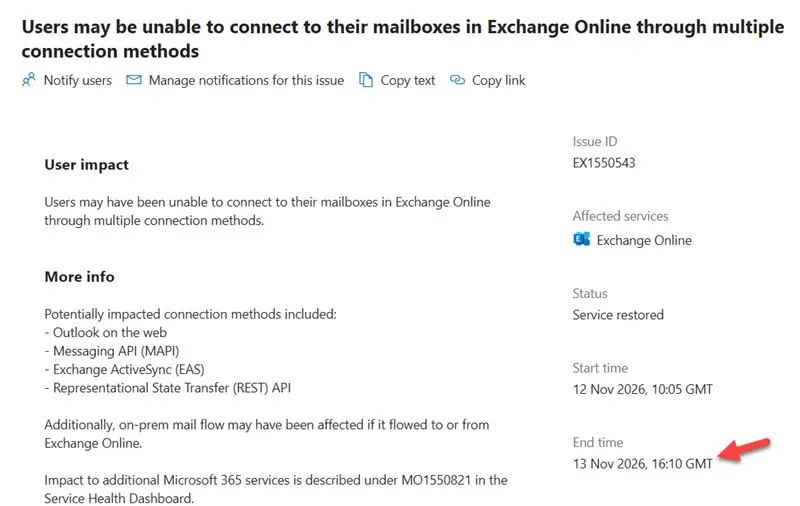
The November 2026 Exchange Online outage showed how a fault in shared networking infrastructure can disrupt email and ripple into other Microsoft 365 services. Microsoft’s preliminary report describes a chain of conditions: a latent Windows defect, heavier traffic on a primary gateway and a 14% loss of gateway capacity. The incident lasted 23 hours and 50 minutes, and restoring service required Microsoft to repair and restart servers in controlled groups.

For administrators, the practical questions are how the outage affected their tenant, what the service level agreement (SLA) counts as downtime, and whether a service credit may be due. The incident also puts the resilience of the network gateways that connect users to Exchange Online under scrutiny.
Two incident records, one outage
Microsoft tracked the Exchange Online incident as EX1550543. Its service history gives a start time of 16:20 GMT on November 12, 2026. An incident graphic displays 10:05 GMT instead, but the account’s author says that time appears to be an error. Email began arriving in that author’s tenant again at about 10:00 GMT on November 13, after nearly 18 hours of impact there.
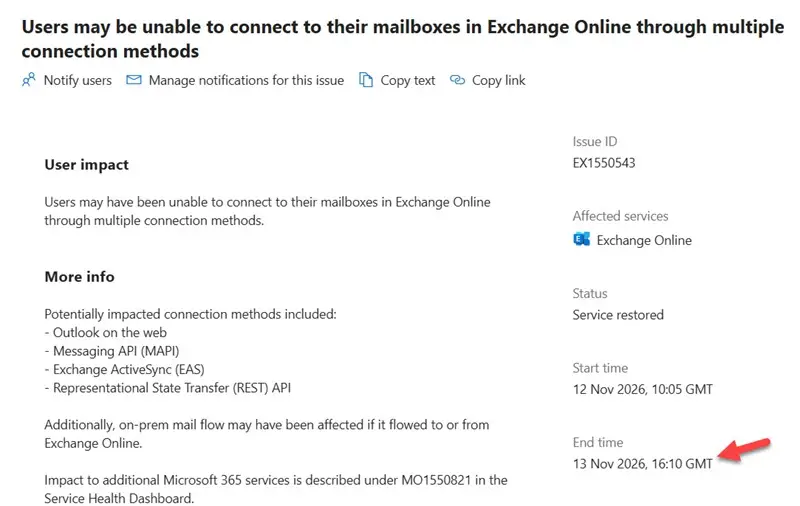
Microsoft’s preliminary Post-Incident Report, issued November 16, puts EX1550543’s total duration at 23 hours and 50 minutes. That figure reflects Microsoft’s assessment of when service recovered, so it differs from the period the author observed in one tenant.
A second record, MO1550821, covers effects on other Microsoft 365 services. Microsoft’s preliminary report gives it the same start time, end time and root cause as EX1550543. The two records therefore describe the Exchange Online failure and its wider effects over the same incident period.
The failure was in Exchange Online’s network path
Although many users encountered the problem through Outlook, Microsoft’s email service—not the Outlook application—was at fault. The distinction matters for troubleshooting: different clients had different experiences because they connect to Exchange Online in different ways and handle offline work differently.
Classic Outlook’s offline capabilities helped it cope better in some cases than the new Outlook. Mobile users had fewer options, while Apple iOS and Samsung mail clients that connect through ActiveSync, and clients such as Thunderbird that use POP3 or IMAP4, could also be affected. Outlook became the visible face of the outage because it is the client many people use, not because the application caused the failure.
Microsoft said there was no indication of malicious or cyber activity. Charles Lamanna, Microsoft EVP for Copilot, Agents, and Platform, described the situation as involving “cascading failures + thundering herds at our network perimeter.”

Three conditions combined at the gateway
Microsoft’s preliminary report points to three conditions that converged on its Microsoft 365 networking gateways. None alone explains the full outage. Together, they triggered a defect that had remained dormant under other operating conditions.
- A latent Windows defect: A Microsoft 365-specific Windows change began deploying globally in July. Under certain loads, a defect in that change could create lock contention, consume CPU and memory, and leave network gateway servers unresponsive. Microsoft says its testing missed the issue because it was more likely to occur on newer hardware with more cores than on the less powerful systems used for load tests.
- More traffic on the primary gateway: About 15 hours before the outage, Teams failed over from an alternative networking gateway to the primary gateway also used by Exchange Online. Microsoft describes this as a normal resilience operation, but it increased the load and changed the traffic pattern handled by the primary gateway.
- Less available capacity: A separate problem had already taken about 14% of gateway server capacity offline. Microsoft believed enough spare capacity remained. The extra Teams traffic, combined with the reduced capacity, created conditions in which the Windows defect could be triggered.
The incident spread because a separate failure prevented the normal isolation boundaries, or “bulkheads,” between gateway capacity units and regions from containing the cascading failures. That breakdown is likely to draw close attention in Microsoft’s final report: the safeguards intended to limit the effect of a failure did not keep it within the expected boundaries.
Services that could fail away from the affected gateway—including Teams, OneDrive, SharePoint and Office apps—recovered sooner. Exchange Online could not move away from the gateway at the scale needed, which helps explain why email remained impaired for longer.
Why recovery took so long
Bringing servers back online did not immediately restore service. The returning capacity was hit by accumulated traffic, which overloaded servers and caused further failures. Microsoft’s automated recovery systems were not designed for a situation in which such a large share of the infrastructure was unresponsive at once.
A routine rollback could not resolve the issue because the defective Windows change had deployed successfully more than three months earlier. Microsoft eventually identified the defect and developed a fix that restored the previous known-good Windows code path. It then took large groups of servers offline, applied the fix, restarted them and returned capacity gradually.
That sequence describes a compounding failure: less capacity and more traffic exposed the defect; resource exhaustion made servers fail; traffic then shifted onto infrastructure that was already under strain. The result was a global cascade, followed by a recovery that had to control the rate at which servers and traffic returned.
The scale of Exchange Online adds context, although Microsoft has not published an updated server count. Microsoft speakers at the MEC 2022 conference said the service then spanned 300,000 physical mailbox servers and handled 9.2 billion messages daily. Microsoft has said it will publish a final Post-Incident Report in the future.
Exchange Online supports more than email
The outage began in shared networking infrastructure, but Exchange Online’s connections to other Microsoft 365 workloads widened its effects. SharePoint Online uses Exchange Online to send sharing links, while Teams relies on it for meeting scheduling. Exchange Online also stores compliance records associated with features such as Microsoft Copilot.
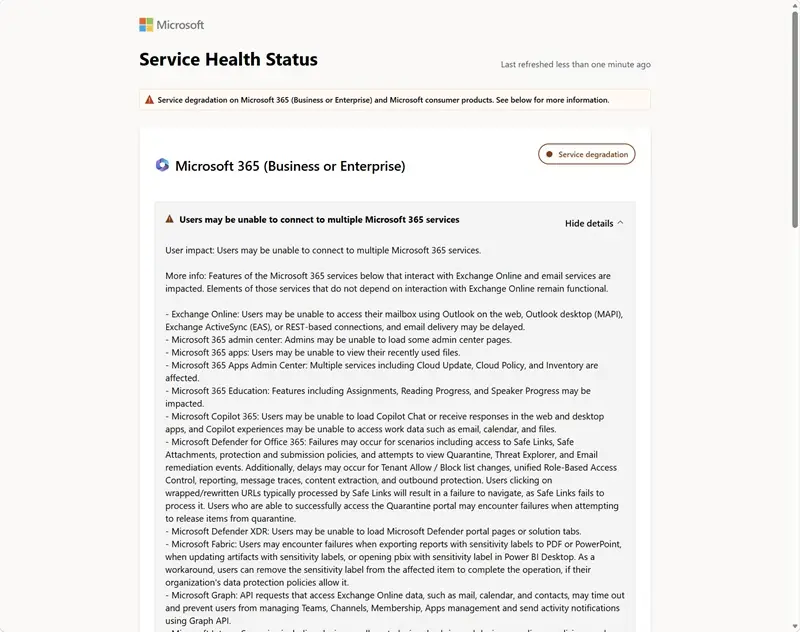
Those dependencies mean that a disruption can affect a feature without making its entire application unavailable. A user might still open a document in SharePoint Online or OneDrive for Business but be unable to share it if Exchange Online cannot deliver the notification. Copilot Chat might also fail if it cannot reach Exchange Online to store compliance records.
The incident account raises the question of whether the departure of experienced Microsoft engineers affected diagnosis or recovery. It offers no evidence that staffing changes slowed the response, and says it is impossible to know whether retaining particular engineers would have shortened the outage. Experience with Exchange Online, Microsoft 365 dependencies and data centre infrastructure could help during a failure, but the incident’s scale may exceed the experience of most engineers working today.
The account estimates a potential user population of around 500 million, based on more than 470 million paid Microsoft 365 seats reported in FY27 Q1 plus free seats used by partners and others. That is an estimate of potential reach, not a count of users who lost service.
What the outage could mean for uptime and credits
Microsoft’s SLA defines Exchange Online downtime by whether users can send or receive email through Outlook Web Access (OWA). That measure uses a direct connection to the service. Microsoft calculates downtime in user-minutes, so the result depends on how many users were affected and for how long. Tenants connected to different data centre regions may have had different outage periods.
November has 43,200 minutes. If every user in a tenant lost Exchange Online access for the full preliminary incident duration of 23 hours and 50 minutes, or 1,430 minutes, the illustrative uptime calculation would be:
(43,200 − 1,430) / 43,200 = 96.69%
That estimate assumes the entire tenant was affected throughout the incident. If only some users lost access, or different users recovered at different times, Microsoft’s user-minute calculation would produce a different figure.
The example falls below 99% and above 95%, the range associated with a 50% service credit under the SLA table below. It is a guide to the possible result for a fully affected tenant, not a confirmed uptime calculation for any customer.
| Uptime percentage | Service credit |
| < 99.9% | 25% |
| < 99% | 50% |
| < 95% | 100% |
A service credit is the SLA’s “sole and exclusive remedy” for service performance or availability issues. Microsoft applies credits against future fees for the affected service; it does not return cash. The SLA also says credits “will not be awarded to compensate for any other forms of loss.”
Many customers buy bundles such as Microsoft 365 E5 rather than Exchange Online alone. A 50% credit for Exchange Online should not be read as half the full Microsoft 365 subscription fee. The credit calculation depends on the affected service, its applicable monthly service fees and the terms that cover it. For context, Microsoft lists Exchange Online Plan 2 at $8 per user per month in the U.S.; that standalone price does not establish the value assigned to Exchange Online within an E5 subscription, which costs $60 per user per month.
Other affected services need separate assessment under their own SLA terms. Each may have experienced a different kind of disruption, and some functions continued while others failed. Whether those effects count as downtime depends on how Microsoft defines availability for each service, so any credit assessment may involve several service-specific calculations.
Microsoft does not apply credits automatically. Customers must submit a claim through the Microsoft 365 admin center or their cloud solution provider (CSP). Claims for the November 2026 incident must be made by the end of December 2026.
Resilience questions for administrators
The outage will renew questions about dependence on cloud services, but on-premises Exchange Server deployments can also suffer serious failures. The difference is the reach: a local outage usually affects one organization, while a cloud failure can disrupt many organizations at the same time.
Exchange Online has mailbox database resilience through Database Availability Groups (DAGs), and tenants are spread across forests made up of DAGs. The incident points instead to the infrastructure that accepts and routes connections into the service. The gateway layer appears to have been the exposed point in this failure, rather than the mailbox database resilience system.
Microsoft’s plans for wider use of agents add another reason to examine these dependencies. In a recent podcast, Satya Nadella described a future Microsoft with 200,000 employees and perhaps 2 million or even 20 million agents “all in a loop.” Agents that access email, calendars, contacts or other mailbox data could add demand to Exchange Online and its supporting infrastructure if their use spreads beyond Microsoft.
Microsoft’s final report should clarify what prevented the gateway isolation boundaries from containing the failure and what changes will address the recovery challenges. For administrators, the immediate work is to review tenant-specific impact, check the SLA calculation for each affected service, and submit any eligible November claim before the end of December 2026.


