LIBOR’s End and SOFR in Excel: What Finance Teams Need to Know
- andysinclair
- 682 views
LIBOR ended in 2024, with SOFR now the US dollar benchmark. Excel users can retrieve current and historical SOFR data with the formulas shown.

Finance teams building debt models or tracking bond costs need to use the benchmark rates that apply now, not a familiar measure that has disappeared. LIBOR was once a central reference for short-term borrowing across currencies. It has now been replaced by rates built on overnight market transactions, including SOFR for US dollars.

At its peak, more than $300 trillion in financial contracts globally were structured around LIBOR. That reach made the rate part of the routine toolkit for professionals working with money markets, foreign exchange, corporate debt and bond pricing. It also meant that its eventual removal had consequences well beyond the interbank market where the benchmark began.
Why LIBOR lost the market’s trust
LIBOR stood for London Interbank Offered Rate. Banks reported the rates at which they said they could borrow funds, and those submissions were used to calculate the daily benchmark. The process depended on banks providing truthful estimates. When that trust broke down, the foundation of the rate became difficult to defend.
In 2012, news emerged that traders had colluded to manipulate LIBOR over a seven-year period to benefit trading positions. The LIBOR rigging scandal exposed a weakness in a benchmark that relied on reported borrowing costs rather than being grounded entirely in completed transactions. The episode damaged confidence in the rate and set the stage for a long transition away from it.
The change took years to complete. LIBOR disappeared entirely in 2024, according to the Bank of England’s account of its end. For teams maintaining financial models, that timeline matters: spreadsheets and contract references built around old benchmarks may need review when they are used for current calculations.
SOFR and the other replacement rates
LIBOR’s replacements are national risk-free rates based on actual transaction data in overnight markets for each currency. For US dollars, the benchmark is SOFR, the Secured Overnight Financing Rate. The euro replacement is €STR, or Euro Short-Term Rate, while the sterling replacement is SONIA, the Sterling Overnight Index Average. Other major currencies have equivalent rates.
These benchmarks differ from LIBOR in how they are formed. LIBOR reflected banks’ reported borrowing costs; the replacement rates use transactions in the relevant overnight markets. That distinction matters when comparing historical data or updating model inputs: a replacement benchmark is not simply a renamed LIBOR series.
For spreadsheet users, the practical task is to identify which currency a calculation concerns, select the corresponding benchmark and make sure the model retrieves data for that rate. A corporate debt or bond pricing workbook that needs a current US dollar reference can use SOFR. A model for another currency needs the matching rate instead.
Retrieving SOFR data in Excel
Excel users can retrieve current and historical SOFR values through Excel Price Feed formulas that access Federal Reserve Economic Data (FRED). The latest available rate can be requested with:
=EPF.FRED.Last("SOFR")Refreshing the spreadsheet retrieves the latest rate available through the formula. That makes it useful for workbooks that need a current observation, although teams should still check that refreshes are working and that the returned value is appropriate for their model’s date and calculation.
To request a historical series covering the last 30 days, the article provides this formula:
=EPF.FRED.HistoricLookback("SOFR",30,"DESC",0)The returned observations can then be used in a worksheet and charted to show how SOFR has changed over the selected period. That view can help a model owner inspect the input history alongside other assumptions. It also gives teams a quick way to spot whether the spreadsheet has populated a series rather than a single current value.
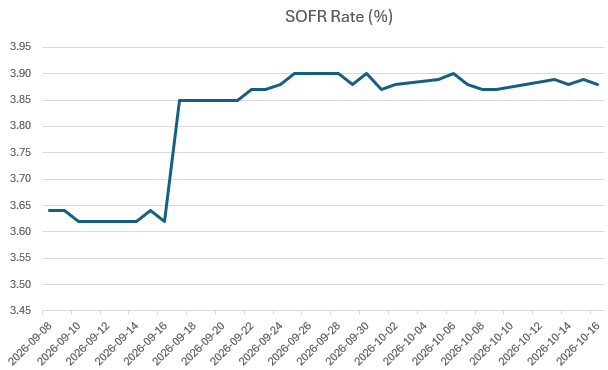
A sample workbook containing SOFR data is available for download. Excel Price Feed also provides a user guide for getting started with its formulas.
What to check in existing models
The transition from LIBOR to overnight benchmarks is a useful prompt to review the assumptions embedded in financial spreadsheets. Check which rate a workbook expects, which currency it covers, and whether the input comes from a live lookup or a stored value. Where historical comparisons matter, label the series clearly so users can distinguish the former LIBOR benchmark from its replacement.
Also check the refresh behavior before relying on a formula for a time-sensitive calculation. Confirm that the workbook returns the intended rate and date, and that any chart or downstream calculation uses the retrieved series as expected. The formulas provide a way to bring SOFR into Excel; the model owner still needs to verify that the resulting data fits the workbook’s purpose.
LIBOR’s history shows how much financial infrastructure can depend on a benchmark’s credibility. For current spreadsheet work, the concrete takeaway is to use the rate that matches the currency and market, and to make the benchmark visible in the model so its users know what they are reviewing.


