Power BI Dataflows Gen2 Email Sequencing Cuts a Four Minute Refresh to 11 Seconds
- Chris Webb
- 835 views
Action.Sequence lets a Dataflow Gen2 query send one email per table row, reducing a test refresh from 4 minutes 15 seconds to 11 seconds.
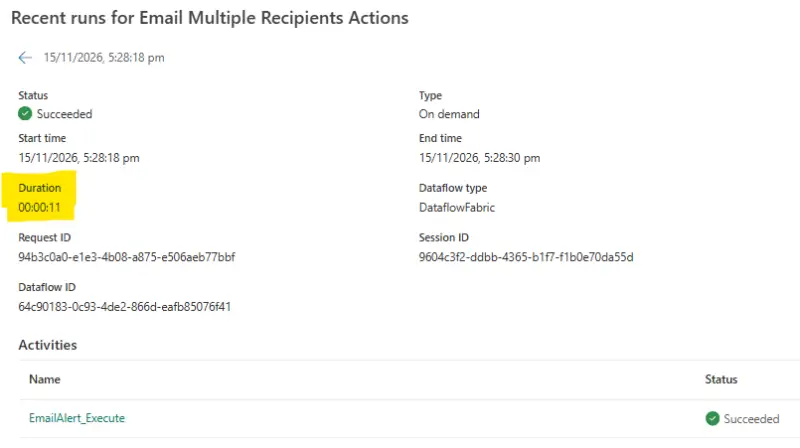
Sequencing email actions in Power Query M reduced a Dataflow Gen2 test refresh from 4 minutes 15 seconds to 11 seconds. The approach sends one email per row from a query, without parameterising the dataflow. That’s a striking improvement in this example, though the technique still needs investigation before teams rely on it in production.
Build one action for each row
The method uses the Send Email action in Dataflows Gen2 alongside M functions that compose actions. An email action is created with AlertAction.Send and MicrosoftOutlook.Actions(). Multiple actions can then be collected into a list and passed to Action.Sequence, which composes them into a sequence.
For example, two individually configured emails can be named FirstEmail and SecondEmail, then passed as {FirstEmail, SecondEmail} to Action.Sequence. The resulting sequence can be returned from the query. This makes the action composition explicit: define each email, gather the actions, and return the sequence for execution.
let
    FirstEmail = AlertAction.Send(
        MicrosoftOutlook.Actions(),
        [
            To = {"[email protected]"},
            Subject = "Email 1",
            Body = "This is the first email"
        ]
    ),
    SecondEmail = AlertAction.Send(
        MicrosoftOutlook.Actions(),
        [
            To = {"[email protected]"},
            Subject = "Email 2",
            Body = "This is the second email"
        ]
    ),
    CreateSequence = Action.Sequence(
        {FirstEmail, SecondEmail}
    )
in
    CreateSequence
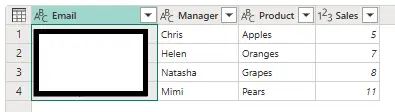
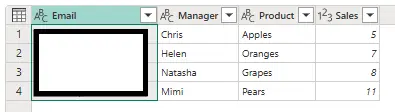
For report bursting, the same idea can be applied to a table rather than a hand-written list. The example starts with a query named Sales. Table.ToRecords converts its rows into records, and List.Transform builds an email action for each record. The recipient, manager, product and sales value are read from that row, so each message uses the data associated with its recipient.
let
    TableRows = Table.ToRecords(Sales),
    EmailList = List.Transform(
        TableRows,
        each AlertAction.Send(MicrosoftOutlook.Actions(), [
            To = {_[Email]},
            Subject = "Sales Report",
            Body = "Hi "
                & _[Manager]
                & ", sales of "
                & _[Product]
                & " were "
                & Number.ToText(_[Sales])
        ])
    ),
    CreateSequence = Action.Sequence(EmailList)
in
    CreateSequence
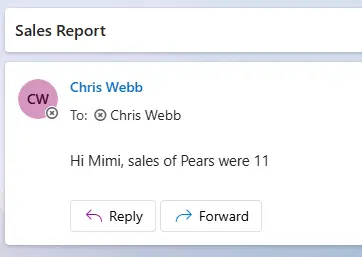
The result is a list of actions derived from the sales rows, composed into a sequence for the dataflow to run. In the test, refreshing the Dataflow sent four emails, matching the output of the earlier parameterised approach.
The measured difference is large
The earlier design used a parameterised Dataflow Gen2 setup to send reports to a recipient list. It worked, but each run took 4 minutes 15 seconds and was described as slow and expensive. The action sequence approach completed in 11 seconds in the reported test. That is a reduction of 4 minutes 4 seconds per refresh, or a little over 96 percent based on those two observed runtimes.
Those figures describe this test, which sent four emails; they don’t establish how the method will perform with larger tables or different dataflow workloads. Still, removing the parameterised pattern appears to have changed the execution time substantially in this case. For teams considering report distribution from a dataflow, the result makes action sequencing a technique to investigate when a parameterised design is proving costly or slow.
Production use remains uncertain
The key limitation is that the implications of using actions inside Dataflows Gen2 are not yet fully understood. The example’s author explicitly cautioned against using the approach in production for now. The M functions involved are also described as not properly documented, so administrators should treat the code as an exploratory pattern rather than a supported operational recipe.
Before considering it for a live reporting process, teams would need to understand how action execution behaves in their own dataflow setup and what happens when a sequence contains many recipients or a message action fails. The example does not establish retry behaviour, delivery guarantees, limits or performance at larger scale, so those details should not be assumed. The code also depends on the fields in the Sales query, including Email, Manager, Product and Sales; a different report would need corresponding fields and message content.
For now, the practical takeaway is to recognize the pattern and its measured potential while keeping it out of production workflows until its behaviour is better understood. The 11-second run makes Action.Sequence worth following as Dataflows Gen2 action support develops, especially for teams evaluating ways to send row-specific reports without a parameterised dataflow.


