Microsoft Ignite 2026: Copilot Adds Autonomous Agents, Office Tools and AI Cost Tracking
- Mike Wheatley
- 439 views
Microsoft’s Copilot plans add autonomous workflows, native Office editing and agent cost tracking, with availability varying by feature.
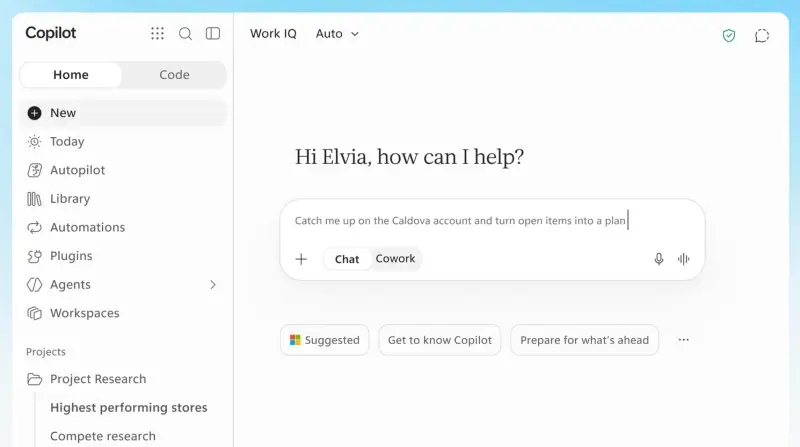
Microsoft’s Copilot plans at Ignite 2026 put autonomous agents at the center of workplace software, with a practical question for IT teams: how will those agents use company data, and how will their work be monitored? The announced features span task delegation, Office files, recurring workflows, custom apps and AI spending. Their availability varies: some are in private preview or early access, while others are planned for the coming weeks.
WorkIQ supplies context for Copilot agents
Microsoft’s proposed foundation is WorkIQ, an intelligence layer intended to help Copilot agents find relevant business information and understand its context. Microsoft Chief Marketing Officer Jared Spataro described a Microsoft 365 environment containing roughly 19.5 exabytes of customer business data, with billions of files, documents, emails and messages added each day. In that volume, access alone doesn’t tell an agent which information matters to its assigned task.
WorkIQ is designed to retrieve relevant data, interpret its intent and filter out material unrelated to the work at hand. Spataro presented it as the reasoning layer beneath Copilot agents. For administrators, the distinction matters: an agent’s usefulness depends not just on what it can reach, but on how it selects and applies information within the organization’s existing permissions.
Home brings chat and task delegation together
Microsoft expects workers to start their day in Copilot Home, a new interface combining chat with Cowork, a portal for delegating tasks to agents. The idea is to give users a place to resume work and launch new requests, rather than treating each interaction as a separate chat session.
Home’s Auto composer routes requests to an AI model suited to the task. For more complex work, Copilot may suggest switching from Chat to Cowork; users can accept the handoff and let the agent continue with a different level of effort. That routing could simplify the user experience, although organizations will want to understand which models handle different tasks and how those choices affect cost and oversight.
A second Home component, Today, is in private preview. It reviews a user’s email, calendar and Teams threads to surface work that needs attention. It can also draft email replies, suggest schedule changes and queue messages for review. These actions make Today more than a summary panel: it aims to help move tasks along while leaving the user involved in reviewing proposed work.
Office files and shared workspaces move into Copilot
Microsoft is bringing Office capabilities into the Copilot application. A user could start with notes on a notepad or whiteboard, then turn those ideas into a Word document or Excel spreadsheet within Copilot. The files will support co-authoring between people and Copilot, and Microsoft says they will remain covered by Microsoft 365 security and compliance controls.
Copilot Workspaces adds a shared canvas for people and agents. An agent can draft part of a document and ask a person to review it; the reviewer can leave comments for agents to address. This creates a review loop around generated work, which may help teams keep human checks within the same workspace where an agent is contributing.
Autopilot handles ongoing work under IT controls
Autopilot is Microsoft’s always-on agent for monitoring and automating recurring tasks. It is available now to subscribers enrolled in Microsoft’s Frontier early-access program. Unlike an agent that waits for each prompt, Autopilot can monitor selected Teams channels and an email inbox for updates, handle repeatable processes and manage multistep work such as a supplier review, Spataro said.
Autopilot has its own Microsoft Entra identity, memory and productivity tools. IT teams control what it can access and can stop its activity if something goes wrong. Its sign-ins and actions are logged under its own name, providing an audit trail. Microsoft says WorkIQ keeps its activity within existing permissions and that Autopilot checks with the user before key actions. Teams evaluating it will need to define its access and responsibilities carefully, then review whether its logged activity matches those boundaries.
Custom apps and agent spending get new oversight
Copilot Code, due to launch in a few weeks, will let knowledge workers create interactive dashboards, persistent desktop widgets and lightweight business applications using natural-language prompts. Microsoft says these generated apps will run in Copilot Managed Runtime, a secure environment that IT teams can monitor for risks to company data. The runtime and monitoring model will be important considerations for organizations deciding whether users can build and use these tools.
Microsoft also updated Agent 365 with Business Analytics, which applies a FinOps-style approach to AI budgeting. Rather than tracking token consumption alone, the feature measures each agent’s work completed and the hours it took. Spataro said that view should help companies assess the return on their AI spending. The stated measures offer a way to connect agent activity with work output, though teams will still need to decide how they value different tasks.
Dynamics 365 and Salesforce connect to Copilot
For Dynamics 365, Microsoft says Copilot agents will gain more than 100 prebuilt skills for sales, service and finance tasks. Those capabilities are intended to connect its customer relationship management and enterprise resource planning platform with Copilot.
Microsoft also announced Copilotforce, a Salesforce integration built on two-way Zero Copy connections between Microsoft Fabric and Salesforce Data 360. It brings Salesforce context into Copilot, Teams and Office. The offering includes 38 prebuilt skills for sales-related work, including retrieving customer data, drafting meeting follow-ups and updating CRM records based on completed tasks.
For administrators, the Ignite plans point to a wider set of decisions than simply enabling an AI assistant. Teams will need to track which capabilities are available to their users, set agent access boundaries, review audit trails and consider how custom apps and agent work fit existing controls. Microsoft’s direction is clear: Copilot is being positioned as a place where people and agents can create, coordinate and complete business work. The next practical checkpoint is how these features perform as they move from preview and early access into broader use.


