Veeam DiskLib Error 13: Coordinating VMware Backup Jobs and Storage Snapshots
- Lucas Magnum
- 891 views
Three parallel datastore job chains ran without recurring NFC errors or retained snapshots for about three weeks, while displayed physical usage fell from 98.7% to 46.4%.
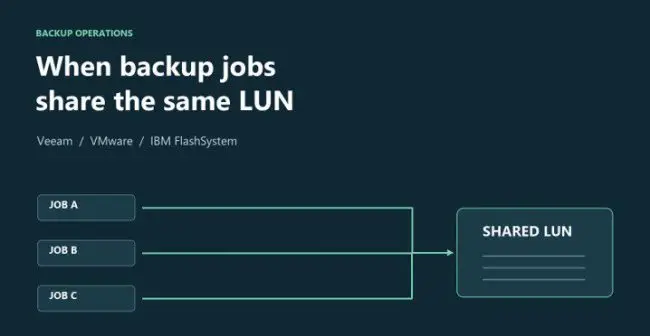
An intermittent DiskLib error 13 can point an investigation toward a file lock, but a failed session may be only one part of a wider backup problem. In this VMware environment, overlapping jobs, retained storage snapshots and limited physical capacity made it necessary to examine how the workload used shared datastores and LUNs.
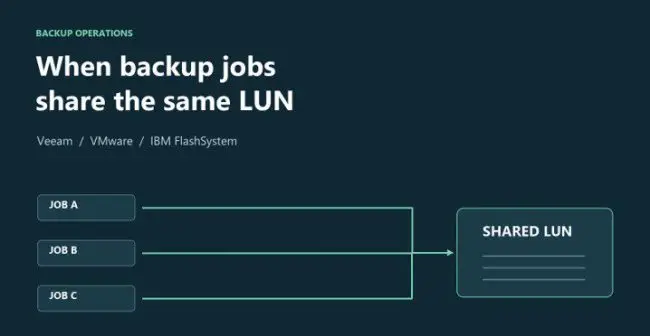
The reported environment had more than 300 VMs and 27 VMware backup jobs scheduled hourly. It ran Veeam Backup & Replication 13.0.1.1071, VMware vCenter 8.0.3 and an IBM FlashSystem FS5200. After the jobs were reorganized into three parallel chains, with sequential jobs inside each chain, neither the NFC error nor snapshot accumulation recurred during approximately three weeks of observation.
What the failed session showed
The error appeared while Veeam prepared a VM for processing:
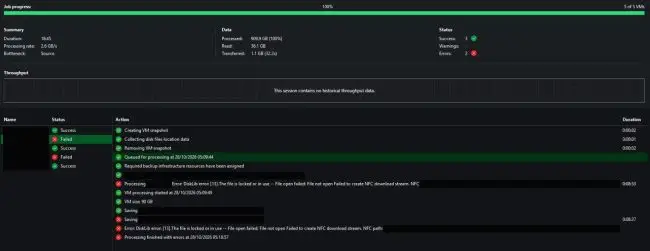
Failed to prepare VM for processing: DiskLib error: [13].The file is locked or in use -- File open failed: File not open
Failed to create NFC download stream.
NFC path: [nfc://conn:[VCENTER],nfchost:[HOST-ID],stg:[DATASTORE-ID]@[VM]/[VM].vmx].
Agent failed to process method {Transfer.FileToText}.
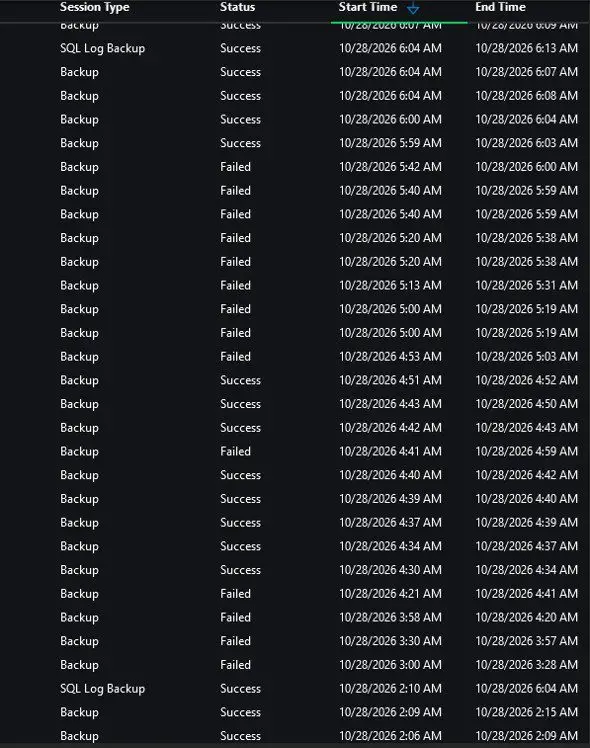
Jobs could succeed on one run and fail on another with the same message. A session could also report 100% progress while leaving individual VM tasks unsuccessful: one recorded run had three successful VM tasks and two failures. That makes the session details more useful than the overall progress indicator when checking whether protection completed.
The reported error named a locked or in-use file and a failed NFC download stream. NFC means Network File Copy in this VMware context. The failure involved VM configuration or state files: the session example showed the .vmx file saved successfully while access to the .nvram file failed.
Veeam KB1198 groups this error family with several investigation paths, including DNS, connectivity, permissions and file locks. The number 13 alone doesn’t identify the cause. Nor does an NFC error on a configuration file establish virtual disk corruption, identify the lock owner, or prove which transport read the VMDK data.
Look at the combined workload
The jobs had independent schedules, so many could become active in the same window. Task limits were already configured, but they did not ensure that each complete cycle of backup processing and storage cleanup finished before other work began. Some sessions processed data while other tasks waited for resources or performed other operations.
Waiting for a resource can be an expected result of a task limit; by itself, it doesn’t prove the infrastructure is overloaded. The more useful signal was the combination of overlapping execution, intermittent failures, snapshots remaining after backup activity and little physical capacity available. Together, those conditions made scheduling and cleanup part of the investigation.
DRS activity around backup runs was another clue to review. DRS handles VM placement and compute resource balancing across ESXi hosts, using vMotion for host migrations. That is separate from Storage DRS and Storage vMotion, which deal with storage placement and migration.
The available evidence did not connect a particular migration to a particular file lock. Establishing that link would require the VM’s host at the time of failure, migration timestamps, the host serving the NFC request and evidence showing who held the lock. Normal vMotion activity alone wasn’t evidence of a fault, so DRS remained an investigation lead rather than a confirmed cause.
Track VMware and storage snapshots separately
Backup from Storage Snapshots involves two snapshot lifecycles. In simplified form, a batch of VMs is prepared with VMware snapshots, a storage snapshot is captured for the relevant volume or LUN, the VMware snapshots are removed, and VM data is read from the storage snapshot. The temporary storage snapshot is then removed after processing.
That sequence means the VMware snapshot can be gone while the storage snapshot is still needed for the backup. In the failed-session example, successful removal of a VMware snapshot did not establish that storage cleanup had finished. Administrators reviewing a job should check both lifecycles, including when snapshots were created, how long they remained, whether processing completed and whether removal succeeded.
The earlier storage view showed 19.68 TiB physically used out of 19.94 TiB, with 267.90 GiB available. That was approximately 98.7% physical utilization. Logical availability did not represent the same thing as physical reserve, so the capacity display made the retained snapshots an operational concern, not just a housekeeping question.

The storage dependency model also needed careful interpretation. If FlashCopy was in use, the relevant relationships would be between source and target volumes and their mappings. A dependency could require data to be preserved or copied before a relationship was stopped or removed. Seeing multiple snapshots on a volume, however, doesn’t by itself prove a cleanup defect or reveal the dependency chain.
Veeam KB4650 explains that supported IBM configurations can use storage volume snapshot functionality instead of FlashCopy, including automatic selection on systems that support it. Firmware capabilities and the plug-in implementation matter. The IBM FlashSystem FS5200 model name alone doesn’t identify which mechanism a job used.
The working hypothesis was that overlapping activity against shared volumes contributed to longer-lived snapshots and more complicated cleanup. Confirming the precise mechanism would require the IBM firmware and plug-in versions, the storage object relationships and cleanup logs. Those details were not available for this case.
Separate the three concurrency controls
Three controls affect backup concurrency, but they act at different points:
- Proxy and repository task limits regulate work at those components.
- Job schedules determine when separate workflows become active.
- The number of VMs per storage snapshot determines how VMs are divided into snapshot batches.
Veeam’s current documentation describes snapshot batches being processed in parallel. Smaller batches can reduce how long VMware snapshots remain open, while creating additional storage snapshots. That setting does not guarantee one active snapshot per LUN, and its historical value in this environment was not recorded.
The practical goal was to coordinate work that touched shared storage while retaining useful concurrency. Task limits could help manage component load, but they did not by themselves coordinate the schedules of jobs using the same LUN.
Organize jobs around datastore and LUN layout
Before changing the job organization, the author discussed protection requirements with the infrastructure administrator. That conversation helped establish which servers needed frequent protection and how the schedule could meet those needs.
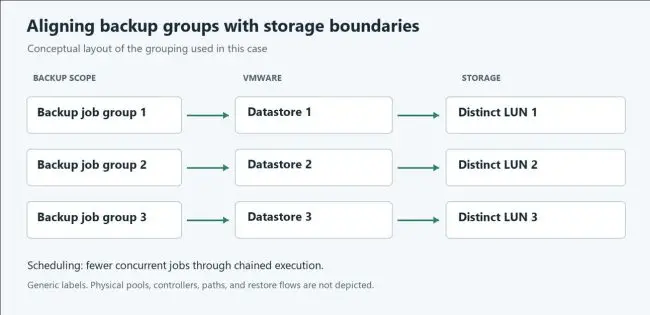
The jobs were then arranged into three groups, each aligned with a datastore and its underlying LUN. Each group ran as a sequential chain: a job started after its predecessor finished. The three chains ran in parallel, preserving concurrency between datastore groups while reducing simultaneous jobs against the same LUN.

This design did not serialize the entire backup environment, and it did not act as a storage-level lock. Hourly backups were not inherently the problem; the relevant question was whether the combined schedule could complete reliably with the resources available.
Job chaining has trade-offs. A long-running job or retries can delay later jobs in its chain, affect the timing of full backups and leave other resources underused. Veeam documents these limits and describes task limits as another way to balance infrastructure load. Chaining was the approach used here, not a universal rule to sequence every backup job.
The VM groups were also reorganized across the three datastores backed by different LUNs, and the same grouping was used for the backup jobs. Veeam’s storage integration guidance recommends datastore-based job organization and discusses parallel jobs as a way to sustain throughput. In practice, the grouping is useful only if it reflects where the VM files and disks actually reside.
Two checks still matter when applying this arrangement. First, confirm the placement of all relevant VM files and VMDKs; disks on other LUNs can preserve overlap between groups. Second, remember that separate LUNs may share a storage pool, controllers, cache, disks or paths. Grouping work by LUN coordinates snapshot activity, but it doesn’t create independent physical resources.
Handle accumulated objects as a separate task
The storage objects that had already accumulated were addressed separately from the scheduling changes. The infrastructure administrator performed a manual cleanup through the storage CLI and identified objects using the naming convention of the Veeam integration.
The available records did not include the command history or an inventory of the object types removed. That means the cleanup cannot be reconstructed as a verified snapshot or FlashCopy removal procedure. A naming prefix alone does not show that an object is unused or safe to delete; any repeat of this work needs to account for the actual objects, dependencies and supported procedure.
Three weeks of observation and a capacity comparison
For approximately three weeks after the combined changes, neither the NFC error nor retained-snapshot accumulation recurred. The three datastore chains continued to run in parallel, with jobs sequenced within each chain. This is an observation window after both the schedule changes and manual cleanup; it doesn’t isolate the effect of each action.
| Metric | Earlier capture | Later capture |
|---|---|---|
| Total physical capacity | 19.94 TiB | 19.94 TiB |
| Physical capacity used | 19.68 TiB | 9.26 TiB |
| Physical capacity available | 267.90 GiB | 10.68 TiB |
| Approximate physical utilization | 98.7% | 46.4% |
| Logical capacity used | 41.42 TiB | 27.00 TiB |
Displayed physical usage fell by approximately 10.42 TiB, or 52.9% relative to the earlier used capacity. This is a comparison of the capacity views, not a measured performance gain or proof that snapshots accounted for all the released space. The interface displayed totals and used capacity in TiB with limited decimal precision, while the earlier available value was shown in GiB, so the rounded figures may not subtract exactly.
The records don’t include a counted series of sessions for calculating a before-and-after failure rate. They also don’t identify the lock owner or exact storage dependency mechanism, and they provide no IBM firmware or plug-in version numbers. No restore test or measured RPO/RTO was recorded either. The supported conclusion is narrower: neither symptom recurred during approximately three weeks of observation, and the later storage view showed substantially more physical headroom.
What administrators should check
- Start with the failed operation. Access to a VM configuration file calls for a different investigation from a virtual disk read or repository write failure.
- Review schedules as a combined workload, including retries, preparation and cleanup windows.
- Read resource queues in context: a task waiting under a limit is not, by itself, evidence of sustained overload.
- Track VMware snapshots and storage snapshots separately, recording creation, age, processing and removal.
- Align job groups with the actual placement of VM files and disks, then coordinate concurrency against the storage resources they share.
- Check how job chains affect later workloads, full-backup timing and protection requirements.
- Record the observation period and cleanup outcome so a stabilization result can be assessed against what changed.
The main operational lesson is to evaluate storage-integrated backups as a combined workload. An intermittent NFC error can start the investigation, but a sound review also covers job timing, host activity, both snapshot lifecycles and physical capacity. Here, three parallel datastore chains reduced same-LUN overlap while retaining concurrency across groups; the follow-up checks should continue to cover cleanup and recovery readiness as well as job status.
References
- Broadcom: VMware DRS Overview
- Veeam KB1198: NFC connectivity troubleshooting steps
- Veeam Backup & Replication Best Practice Guide: Storage Integration
- Veeam KB4650: IBM FlashSystem Plug-In release information
- Veeam Backup & Replication 13 User Guide: Automatic Startup Schedule
- Veeam Backup & Replication 13 User Guide: Limitation on Number of VMs per Snapshot
The Help Center pages are maintained as the product evolves. The two Veeam 13 guide pages describe a later v13 build than the Veeam Backup & Replication 13.0.1.1071 reported for this environment, so they provide guidance rather than verification of its historical settings.


