Microsoft Copilot Cost Management API: What Admins Can Report and Configure
- Vasil Michev
- 624 views
The preview API reports tenant and user credit use and manages spending policies, but limited permissions and gaps with the admin center complicate operations.

Microsoft’s public preview Copilot Cost Management API gives Microsoft 365 administrators ways to retrieve credit balances, inspect individual users’ consumption, and manage spending policies. It can support reporting and basic controls for usage-based billing, but teams should expect extra requests and some mismatches with the Microsoft 365 admin center.
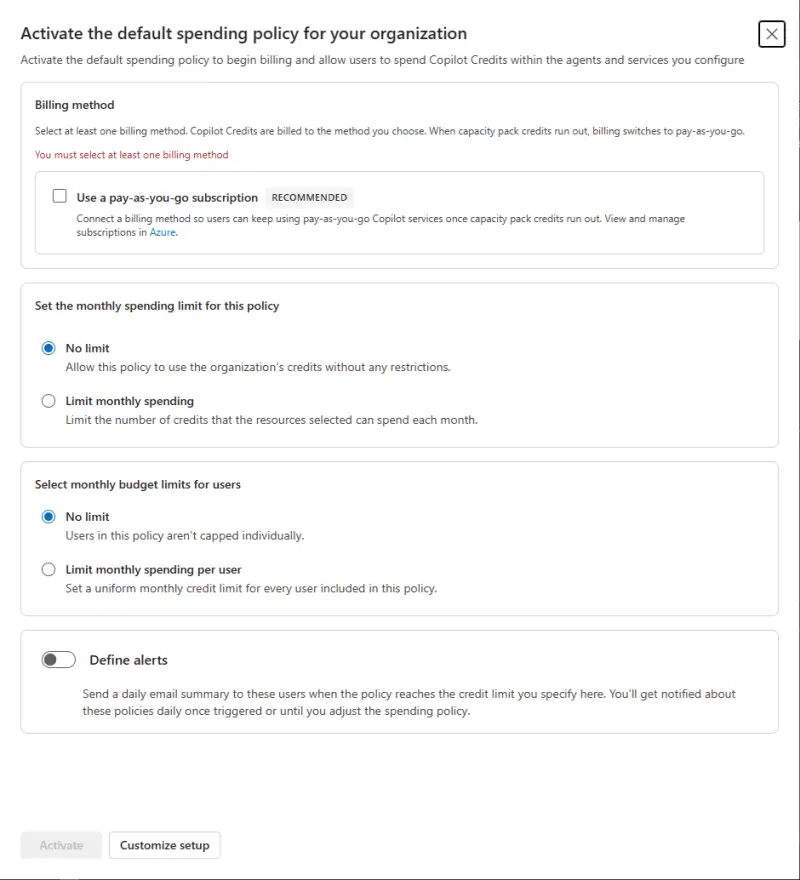
The API is part of Microsoft Graph’s beta endpoint set. It covers information and settings found under Copilot > Cost Management in the Microsoft 365 Admin Center. A supported billing method must already be configured: Pay-as-you-go (PAYG) linked to Azure, Copilot Capacity Packs, the Copilot Credit Pre-purchase Plan, or a combination of these. Services and agents outside usage-based billing are out of scope.
Scope and operational limits
The API reports balances and helps configure spending policies; it does not set up the billing methods themselves. For example, administrators can’t use it to link an Azure subscription. Nor does it return actual prices. The balances are denominated in Copilot credits, so teams that need to understand monetary costs will have to do additional work outside the API.
There are two practical constraints to account for before building automation. First, delegated permissions are required for nearly all the methods described here. Only the tenant credit balance method also supports application permissions, which limits unattended, app-only workflows. Second, the API and admin center don’t have full feature parity. Policies created through the API may display incorrectly in the interface, and administrators may be unable to edit or delete them there. Some controls visible in the interface are missing from the API altogether.
The API also doesn’t supply historical usage records. A balance query returns consumption as of the request date. Teams can build their own history by periodically retrieving and storing results, but forecasting and translating credits into actual costs will require further analysis.
Permissions and roles
Microsoft Graph permissions control access to the methods. The directory roles required depend on the operation: Billing Administrator or Global Administrator for creating spending policies, and AI Administrator and License Administrator for policy management. The examples below were run with a Global Administrator account, so they may not represent the experience of an account with fewer roles.
- CopilotCostManagement.Read.All retrieves the tenant credit balance.
- CopilotCostManagement-Policy.Read.All and CopilotCostManagement-Policy.ReadWrite.All support reading, creating, updating, and deleting policies, along with their service settings and alerts.
- CopilotCostManagement-Assignment.Read.All and CopilotCostManagement-Assignment.ReadWrite.All support reading, adding, and removing groups assigned to a policy.
- CopilotCostManagement-UserData.Read.All retrieves per-user details.
If you use Graph Explorer, the permissions above may not appear in its consent control. Administrators will need another way to add them. Microsoft’s permission guidance describes delegated permission management in more detail: managing delegated permissions for specific users.
Retrieving tenant and user balances
For the tenant’s current balance, send a GET request to /beta/copilot/costManagement/getTenantCreditBalance:
GET https://graph.microsoft.com/beta/copilot/costManagement/getTenantCreditBalance
The response reports credits consumed by configured billing method. Depending on the methods in use, it can also include fields such as purchasedQuantity and remainingQuantity. The dataStatus field indicates that the figures represent the current consumption at the time of the request; it doesn’t provide a usage timeline. Microsoft describes the response structure in its costManagementBillingMethodBalance resource reference.
This tenant balance method is the only one covered here that supports application permissions as well as delegated permissions. That distinction matters for administrators planning scheduled collection: tenant-level reporting can be app-only, while the user balance requests below need delegated access.
To retrieve one user’s consumption, use /beta/copilot/costManagement/userBalances/{userId}. The identifier must be the user’s GUID; the endpoint doesn’t accept a UPN. There is no list method, so collecting data for multiple people means making a separate request for each user object.

GET https://graph.microsoft.com/beta/copilot/costManagement/userBalances/xxxxxxxx-xxxx-xxxx-xxxx-xxxxxxxxxxxx?$expand=*
Use the $expand operator to request the per-service breakdown, or make a separate request to /serviceBalances. The returned service details include consumption, configured limits, and remaining amounts. Microsoft documents those properties in the costManagementUserServiceBalance reference.
Periodic collection can give administrators a useful record of tenant and individual consumption. It won’t, by itself, show the monetary cost incurred or provide built-in history or forecasting. Those outputs depend on how the collected credit data is stored and combined with other cost information.
Creating spending policies
Administrators can use policies to set a tenant-wide limit with the default All Users Policy, or create policies for particular services or groups. Plan the audience before creating a policy: once the policy exists, its audience can’t be changed. Policies are created disabled, and a group-scoped policy also needs at least one group assignment before it can be enabled.
Creating a policy requires the CopilotCostManagement-Policy.ReadWrite.All delegated permission and a Billing Administrator or Global Administrator role. Managing group assignments also requires CopilotCostManagement-Assignment.ReadWrite.All. The request must include an @odata.type value to specify the policy type. A display name must contain at least 10 characters and can’t include special characters.
Two required properties set the credit limits: periodLimit sets the policy limit for the period, while perUserLimit sets the limit for each user. The policy must also define which services it covers through the serviceSettings relationship. The serviceSettings reference describes the service configuration.
You can optionally specify billingMethods and alert settings. For a group-scoped policy, you can include the audience through assignedGroups during creation, or assign groups afterward with the Add assigned group method.
Send a POST request to /beta/copilot/costManagement/spendingPolicies. This example creates a group-scoped policy for the cowork service, with limits of 22,222 credits per period and 2,222 credits per user:

POST https://graph.microsoft.com/beta/copilot/costManagement/spendingPolicies
{
  "@odata.type": "#microsoft.graph.selectedGroupsSpendingPolicy",
  "displayName": "Test policy",
  "billingMethods": "payAsYouGo",
  "periodLimit": {
    "@odata.type": "#microsoft.graph.limitedCostManagementQuantity",
    "unit": "copilotCredit",
    "value": 22222
  },
  "perUserLimit": {
    "@odata.type": "#microsoft.graph.limitedCostManagementQuantity",
    "unit": "copilotCredit",
    "value": 2222
  },
  "serviceSettings": [
    {
      "serviceId": "cowork",
      "state": "enabled"
    }
  ]
}
A successful creation returns 201 Created. The policy still starts disabled and without assigned groups, even when its type is selectedGroupsSpendingPolicy. Add the group audience in a separate request, using the assignment endpoint and permission:

POST https://graph.microsoft.com/beta/copilot/costManagement/spendingPolicies/a42d02da-f777-49df-95aa-94069f58474d/microsoft.graph.selectedGroupsSpendingPolicy/assignedGroups/$ref
Content-Type: application/json
If-Match: "ab01bc42-0000-0c00-0000-6ae06f550000"
{
  "@odata.id": "https://graph.microsoft.com/beta/groups/ecdbc965-b30b-47d7-8dbe-904fd286aa46"
}
Updating and removing policies
PATCH and DELETE requests require the policy’s current ETag in the If-Match header. The ETag is separate from the policy ID. Retrieve the policy and check its @odata.etag property or the response’s etag header before making a change.
PATCH https://graph.microsoft.com/beta/copilot/costManagement/spendingPolicies/1b3e8106-b888-4c22-bb23-d48f6a8ad010
Content-Type: application/json
If-Match: "a701c460-0000-0c00-0000-6ae05fd00000"
{
  "displayName": "Pilot teams monthly cap"
}
A successful update returns 200 OK, and the policy’s ETag changes. Use the new value for the next PATCH or DELETE request. Deleting a policy uses the same endpoint family and also requires the current ETag:

DELETE https://graph.microsoft.com/beta/copilot/costManagement/spendingPolicies/1b3e8106-b888-4c22-bb23-d48f6a8ad010
If-Match: "a901ccfa-0000-0c00-0000-6ae06a980000"
Policy deletion through the API can still encounter a compatibility problem: the interface may return a “Not Supported” error indicating that policies can’t be deleted through the legacy configuration-plan DELETE operation. Administrators should account for the API and interface behaving differently when managing policies created through Graph.
Alerts and interface gaps
Policy alerts are email notifications sent to individual users in the organization. They can trigger when consumption reaches a specified credit amount or a percentage of the configured limit. Groups, including mail-enabled groups, and external addresses aren’t supported. Alerts are informational; they don’t change access to the services covered by the policy.
Alert settings can only be configured after policy creation. The workflow is unusual: a GET request to the policy’s /emailThresholdSettings endpoint can return 404 Not Found, and there is no POST method to create the object. Instead, PATCH the endpoint to instantiate the settings, then add a recipient, and PATCH again to enable the alert and set thresholds. Each change requires the current ETag.
Microsoft’s emailThresholdSettings reference describes the alert object, and its threshold reference covers threshold types. The example below adds one user and enables an absolute threshold of 44,444 Copilot credits:
PATCH https://graph.microsoft.com/beta/copilot/costManagement/spendingPolicies/a42d02da-f777-49df-95aa-94069f58474d/emailThresholdSettings
If-Match: "ab01a2f9-0000-0c00-0000-6ae072330000"

POST https://graph.microsoft.com/beta/copilot/costManagement/spendingPolicies/a42d02da-f777-49df-95aa-94069f58474d/emailThresholdSettings/recipients/$ref
If-Match: "b7019890-0000-0c00-0000-6ae0a8410000"
{
  "@odata.id": "https://graph.microsoft.com/beta/users/584b2b38-888c-4b85-8871-c9766cb4791b"
}

PATCH https://graph.microsoft.com/beta/copilot/costManagement/spendingPolicies/a42d02da-f777-49df-95aa-94069f58474d/emailThresholdSettings
If-Match: "b701a0ef-0000-0c00-0000-6ae0aa2f0000"
{
  "isEnabled": true,
  "thresholds": [
    {
      "@odata.type": "#microsoft.graph.absoluteCostManagementAlertThreshold",
      "value": 44444,
      "unit": "copilotCredit"
    }
  ]
}
The API doesn’t expose the admin center’s “Alert when a user’s monthly spending reaches” setting. Other gaps include the interface option to allow new agents and services as they become available. The API also doesn’t return serviceSettings or emailThresholdSettings through $select or $expand, so retrieving a policy’s full configuration can take multiple calls.
For a tenant-wide policy, the audience assignment step isn’t needed. Set @odata.type to #microsoft.graph.allUsersSpendingPolicy. Before relying on the preview API for routine administration, account for its delegated-permission requirements, per-user request pattern, ETag handling, and differences from the admin center. It can provide a useful foundation for credit reporting and policy management, but the current gaps make careful validation and local data collection part of the implementation.


